Subcloak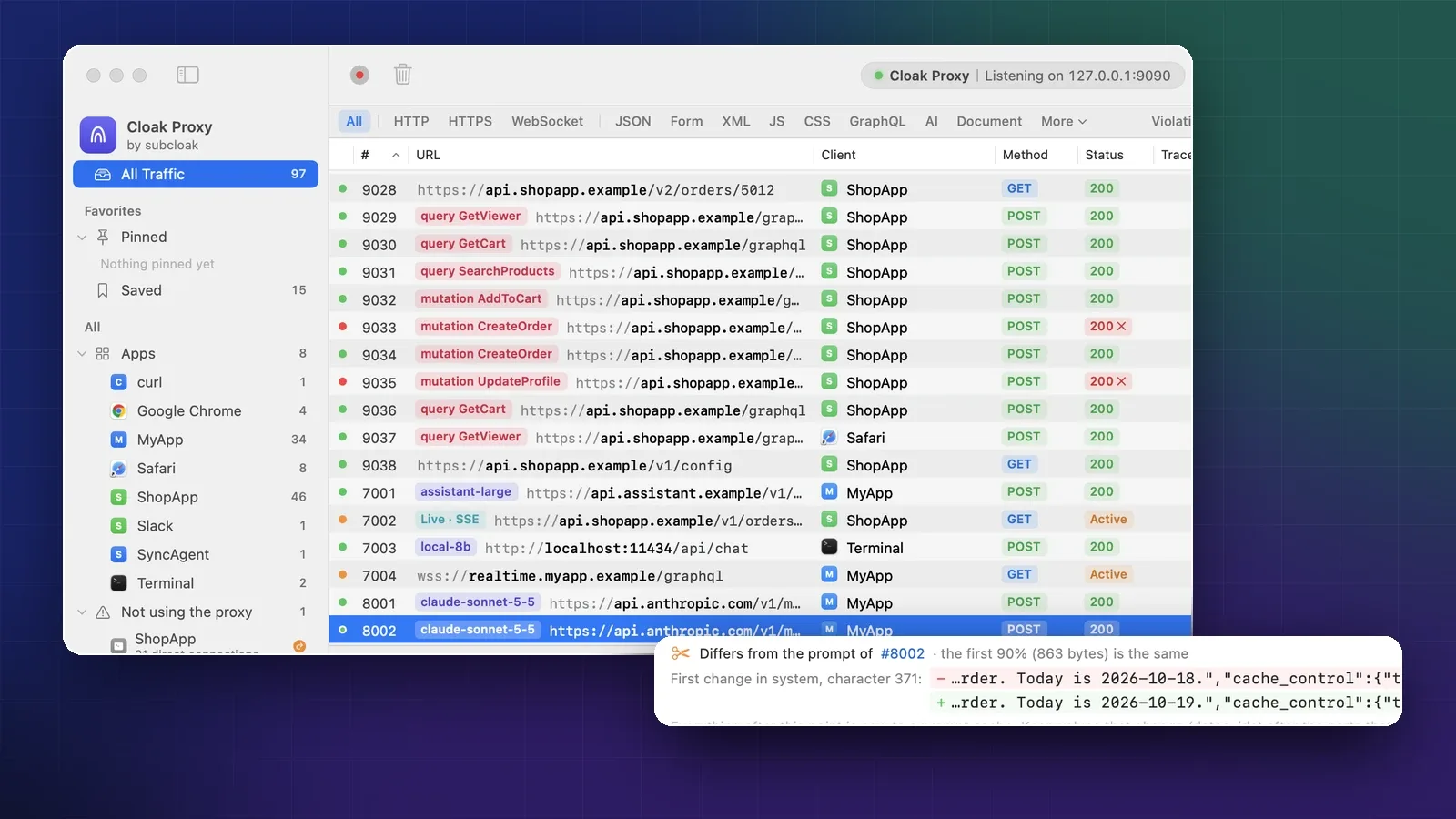
On this page
- Route the agent’s traffic through Cloak Proxy
- Mac apps and desktop agents
- Command-line agents, Node.js and Python
- Decrypt the API hosts
- Read one call in the AI tab
- Where the time went
- The prompt and the tool calls
- Why the prompt cache misses
- Find the first change
- Fix it: stable first, dynamic last
- Provider facts worth knowing
- Add it up across a run
- Check cost in scripts and CI
- Keep your API keys out of what you share
- When to use something else
- Sources
- FAQ
An agent built on the OpenAI, Anthropic or Gemini APIs makes calls you never see: the framework builds the prompt, adds tools, replays the conversation and streams the reply. When the bill is high, the agent feels slow, or the cache hit rate is zero, you need the actual requests.
This guide routes an agent’s traffic through Cloak Proxy, a free debugging proxy for Mac, and reads each model call: the exact prompt, tokens, an estimated cost, time to first token, tool calls, and the first byte where the prompt stopped matching the cache. It works for Mac apps, command-line agents such as Claude Code, and scripts built on LangChain or a provider SDK, with no code change.
Route the agent’s traffic through Cloak Proxy
Mac apps and desktop agents
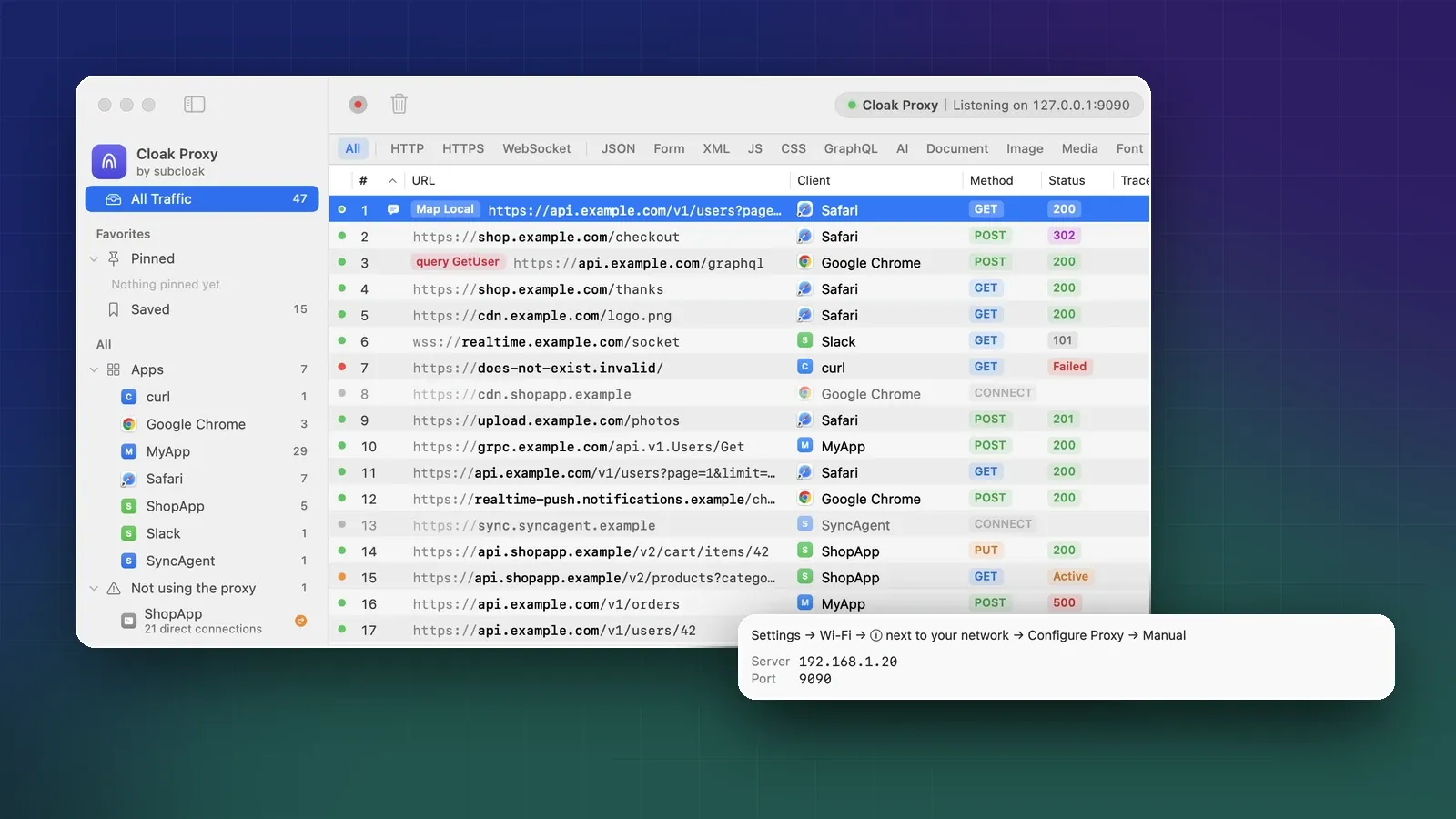
Apps that follow the macOS proxy settings need one switch: Proxy › Capture macOS Traffic (⇧ ⌘ P), or the macOS Proxy button in the toolbar. Apps in the iOS Simulator usually show up too. For a phone, see how to see an iPhone app’s traffic on a Mac.
If an app doesn’t appear, look in the sidebar under Not using the proxy: those apps ignore the system settings. Click one and choose Use App Capture (new in 0.5.0): a network extension you allow once in System Settings sends every connection of the apps you pick through Cloak Proxy. See Capture apps that ignore the proxy. The Doctor explains why an app is missing and offers the same fix as Capture all its traffic.
Command-line agents, Node.js and Python
Command-line tools usually ignore the macOS proxy. They read environment variables instead, and keep their own trusted certificates. Cloak Proxy sets both:
- Click Devices in the toolbar to open Device & Runtime Setup, then choose Terminal.
- Click Open Terminal. The new window prints that this shell’s HTTP(S) traffic goes through
127.0.0.1:9090(or the port you set). - Start your agent from that window.
The window exports HTTPS_PROXY, NODE_USE_ENV_PROXY=1 (Node.js 24 and later then send fetch through the proxy), NODE_EXTRA_CA_CERTS, and SSL_CERT_FILE and REQUESTS_CA_BUNDLE pointing at a bundle of the macOS roots plus Cloak Proxy’s certificate. To configure a shell you already have open, use Copy on the same page, or, with cloakctl on your PATH (Settings › Advanced shows the command to link it), let it print the lines:
eval "$(cloakctl env)"
claude            # Claude Code reads HTTPS_PROXY and NODE_EXTRA_CA_CERTS
python3 agent.py  # or your own agent
Claude Code documents both variables, so it works from a configured Terminal. Other agents and SDKs vary: if one fails the TLS handshake or skips the proxy, check its proxy settings. Most SDKs accept your own HTTP client with a proxy and a CA file. If a tool ignores the proxy variables entirely, as many Go and Rust binaries do, add it to App Capture in Proxy › Device & Runtime Setup….
Decrypt the API hosts
Out of the box, HTTPS passes through as locked CONNECT tunnels. Turn on SSL Proxying for the hosts your agent calls: right-click a locked row and choose Enable SSL Proxying for the host, or add the host in Cloak Proxy › Settings… › SSL Proxying:
api.openai.com
api.anthropic.com
generativelanguage.googleapis.com
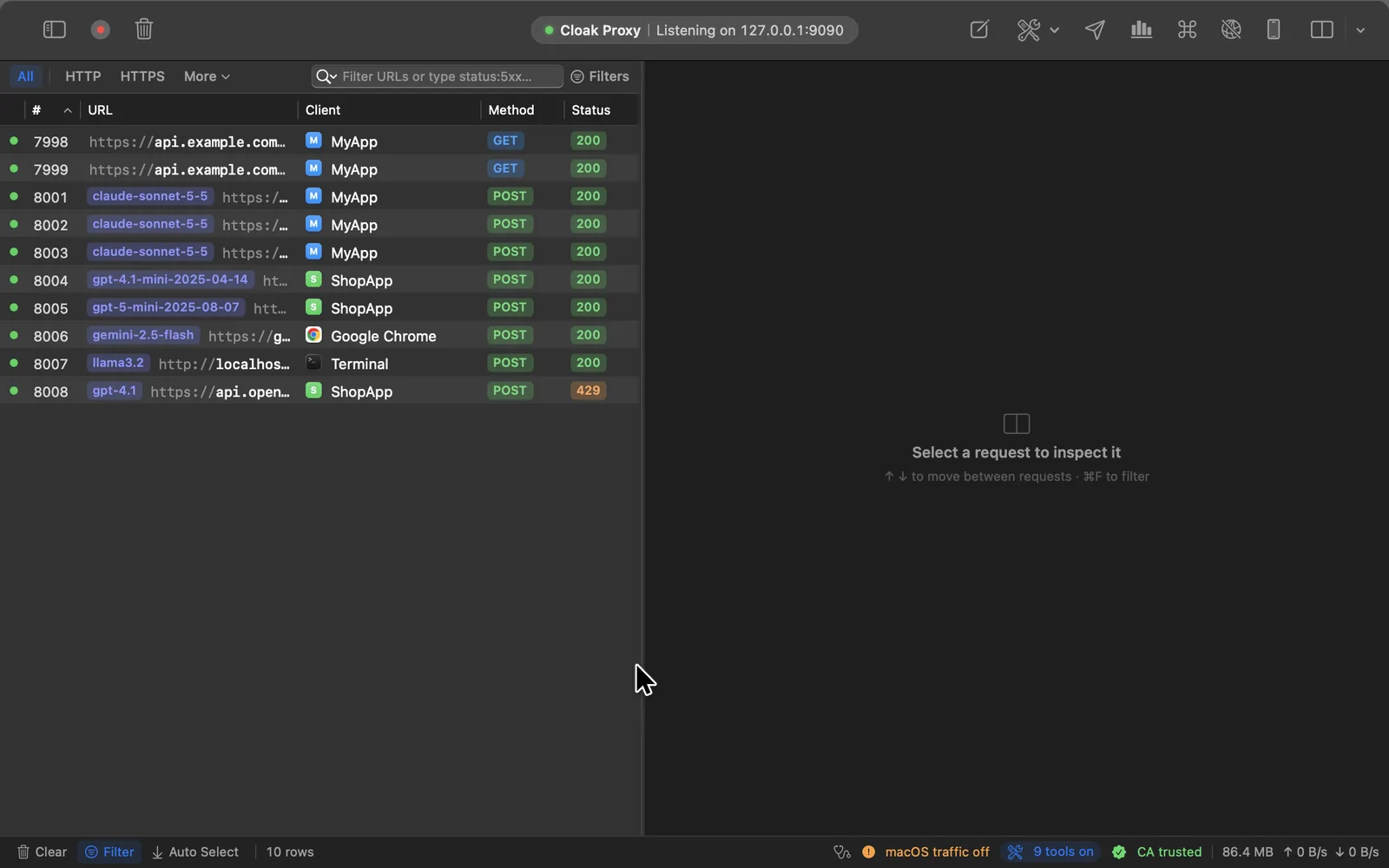
Then run the agent and click AI in the filter bar. Each model call gets an indigo badge with its model name before the URL, with Live · in front while the reply is still streaming.
It recognizes OpenAI Chat Completions and compatible servers (Azure OpenAI, OpenRouter, Groq, vLLM and others), OpenAI Responses, Anthropic Messages, Google Gemini and Ollama. Frameworks like LangChain call these same APIs, so their calls show up too.
Read one call in the AI tab
Select a call and the response pane opens on the AI tab.

- Input counts every prompt token, with the share read from the cache, no cache hit, or how many tokens were written to it.
- Output includes reasoning tokens when the model reports them; they’re billed as output.
- Cost is a price-list estimate, with what the cache saved.
- First token is the time until the first piece of the reply: text, reasoning or a tool call.
- Speed is output tokens per second from the first token to the last.
- Stop turns orange when the reply was cut short (
max_tokens,length,refusal,content_filter).
The Context window bar shows where the prompt went: System prompt, Tool definitions, History, Images and New turn. Here, tool definitions are 35% of every request, worth knowing before you add a tenth tool. Without token counts in the response, the bar says estimated. That happens with OpenAI Chat Completions streams unless the request sets stream_options: {"include_usage": true}, which adds a final chunk with usage for the whole request.
Where the time went
Time to first token is the delay a user feels. Speed only matters after it.
For the raw events, open the Messages tab: every server-sent event with its arrival time and the gap since the previous one, orange from one second. The stream passes through as it arrives, so your chat UI keeps streaming. See Streaming responses.
The prompt and the tool calls
The Prompt section shows the request as a transcript: system prompt, tools, then one row per message.
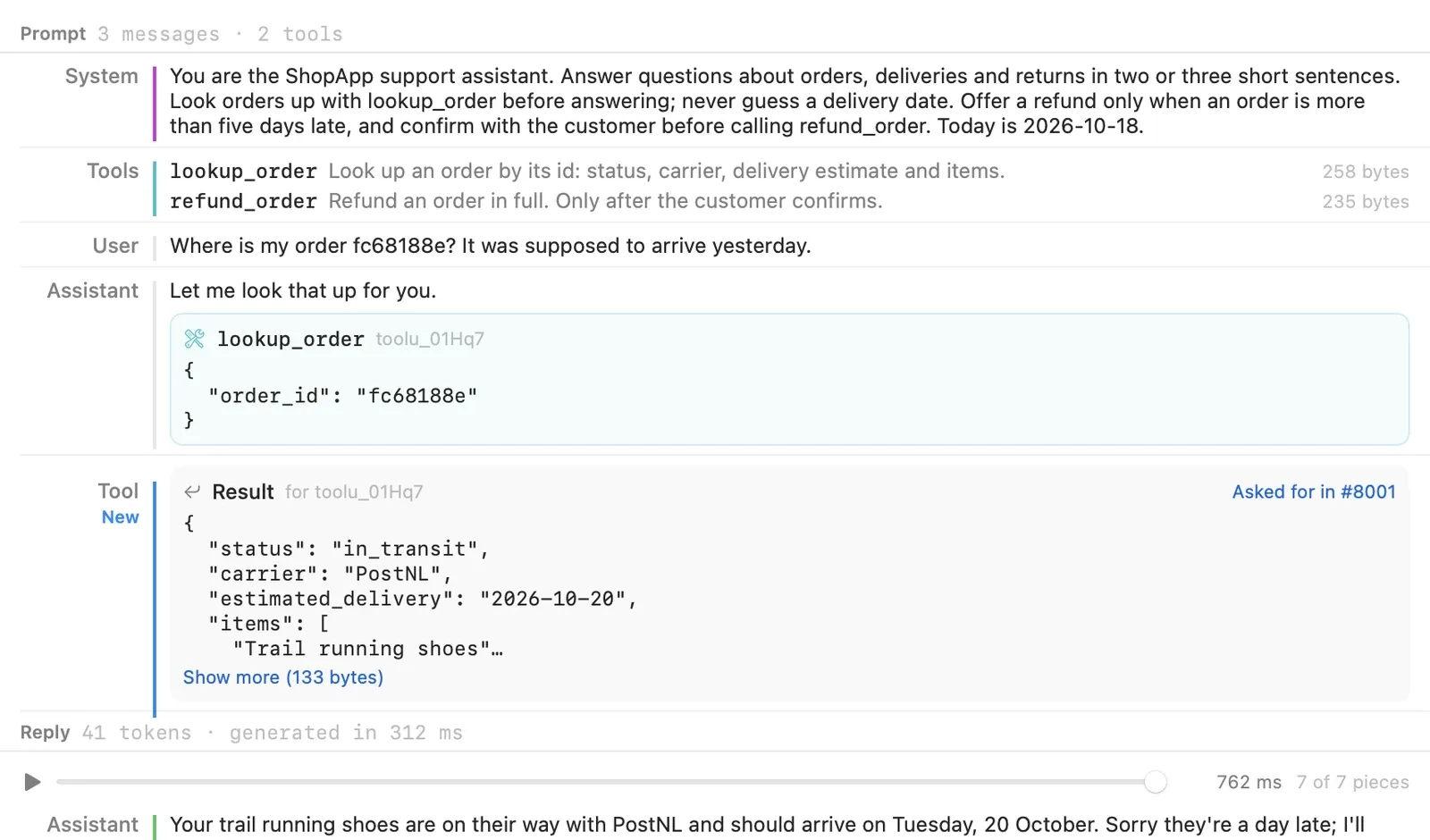
Tool-call arguments that aren’t valid JSON get a red Invalid JSON badge, the first thing to check when a tool silently fails. The Reply slider replays the streamed answer: drag it, or press play to watch it arrive at its real pace (long replies are sped up to five seconds).
Notice the end of the system prompt: Today is 2026-10-18. With a date there, the cache breaks once a day. With a timestamp or a request id, it breaks on every call.
Why the prompt cache misses
OpenAI and Anthropic both cache the start of a prompt. A request reuses the cache only when its prompt begins with exactly the same bytes; everything from the first change on is processed again at the full or cache-write price, and only the part up to the last cache entry before it can be reused. Anthropic builds the prefix from tools, then system, then messages, and a change at one level invalidates that level and every level after it. OpenAI says the entire rendered prefix must match. So a changing value in the system prompt costs you everything that comes after it.
Find the first change
Under the context window bar, Cloak Proxy compares the prompt with the earlier call to the same host and model that shares the most of it from the start:
- Adds to the prompt of #N means this prompt is the earlier one plus new turns, so a cache can reuse all of the earlier part.
- Differs from the prompt of #N names the first change (system prompt, tool definition or message), its character, and the text before (−) and after (+).
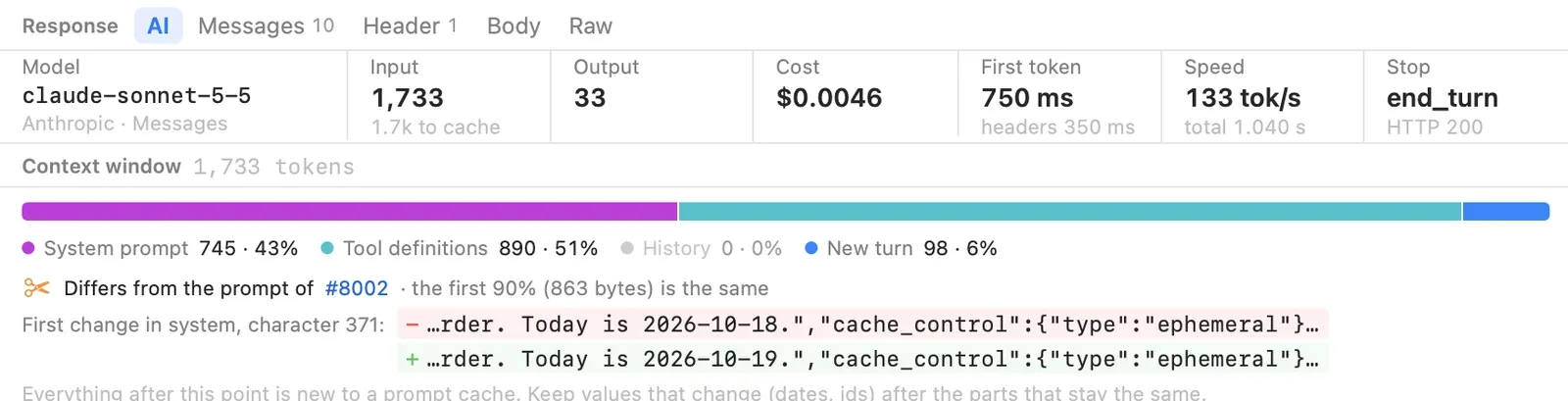
Compare the two screenshots: with the cache, a turn cost an estimated $0.0012 and its first token came at 450 ms; without it, $0.0046 and 750 ms. Caching cut the wait as well as the bill.
The usual culprits, in prompt order:
- A tool list that changes. Tools come first, so adding, removing, reordering or rewording one invalidates everything. Watch tool lists assembled at runtime, for example from several MCP servers.
- Dynamic values in the system prompt. Dates, times, user names, request ids, feature flags.
- Rewritten history. Trimming or summarizing earlier turns changes the prefix. Append instead.
- Settings. On Anthropic, changing
tool_choice, the thinking or effort settings, or adding or removing images, invalidates cached messages.
Fix it: stable first, dynamic last
Put what never changes first (tools, then instructions) and what changes last; both providers give this advice. On Anthropic, a top-level cache_control turns on automatic caching for the growing conversation, and a breakpoint on the system block keeps tools and instructions reusable across conversations:
curl https://api.anthropic.com/v1/messages \
  -H "x-api-key: $ANTHROPIC_API_KEY" \
  -H "anthropic-version: 2023-06-01" \
  -H "content-type: application/json" \
  -d '{
    "model": "claude-sonnet-5-5",
    "max_tokens": 512,
    "cache_control": {"type": "ephemeral"},
    "system": [
      {
        "type": "text",
        "text": "You are the ShopApp support assistant. Answer questions about orders, deliveries and returns in two or three short sentences.",
        "cache_control": {"type": "ephemeral"}
      }
    ],
    "messages": [
      {"role": "user", "content": "Today is 2026-10-19.\n\nWhere is my order fc68188e?"}
    ]
  }'
The date now travels in the first user message. On the next turn that message is unchanged history, so it stays in the cached prefix. (This short example is below the minimum cacheable length; your real tools and instructions won’t be.) Run the agent again: the second call should read Adds to the prompt of #N, with a cached share under Input.
On OpenAI’s GPT-5.6 and later, automatic caching writes through to the end of the prompt, so a changing user message right after a stable developer message gets no reuse. Add a breakpoint after the stable part: set prompt_cache_options.mode to "explicit" and put prompt_cache_breakpoint: {"mode": "explicit"} on the last stable content block.
Provider facts worth knowing
| Anthropic | OpenAI | |
|---|---|---|
| How it turns on | cache_control on the request (automatic) or on blocks (up to 4 breakpoints) |
On by default for supported models |
| Minimum prompt | 512 tokens on current models; 1,024 to 4,096 on some older ones | 1,024 tokens for GPT-5.6 and later; varies by request settings on earlier models |
| Lifetime | 5 minutes, refreshed on each hit; "ttl": "1h" for an hour |
prompt_cache_options.ttl: "30m" on GPT-5.6+; prompt_cache_retention on earlier models |
| Usage fields | cache_read_input_tokens, cache_creation_input_tokens; input_tokens is only what came after the last breakpoint |
usage.input_tokens_details.cached_tokens (Responses), usage.prompt_tokens_details.cached_tokens (Chat Completions) |
| Price | Writes 1.25× input (2× for the 1-hour cache), reads 0.1× (0.05× on Opus 5.5 and Sonnet 5.5) | On GPT-5.6+, writes 1.25× and reads 0.1× on most models (0.05× on GPT-6.1 Sol); earlier models have no write charge and a model-dependent read price |
Two Anthropic details catch people out. Entries are written only at breakpoints, so a matching prefix that no earlier request marked can’t be read. And a prompt below the minimum is processed without caching or an error: both cache fields are 0.
Add it up across a run
One call tells you why. A whole session tells you how much. Open Tools › Insights… (⌥ ⌘ I) and choose the AI tab.
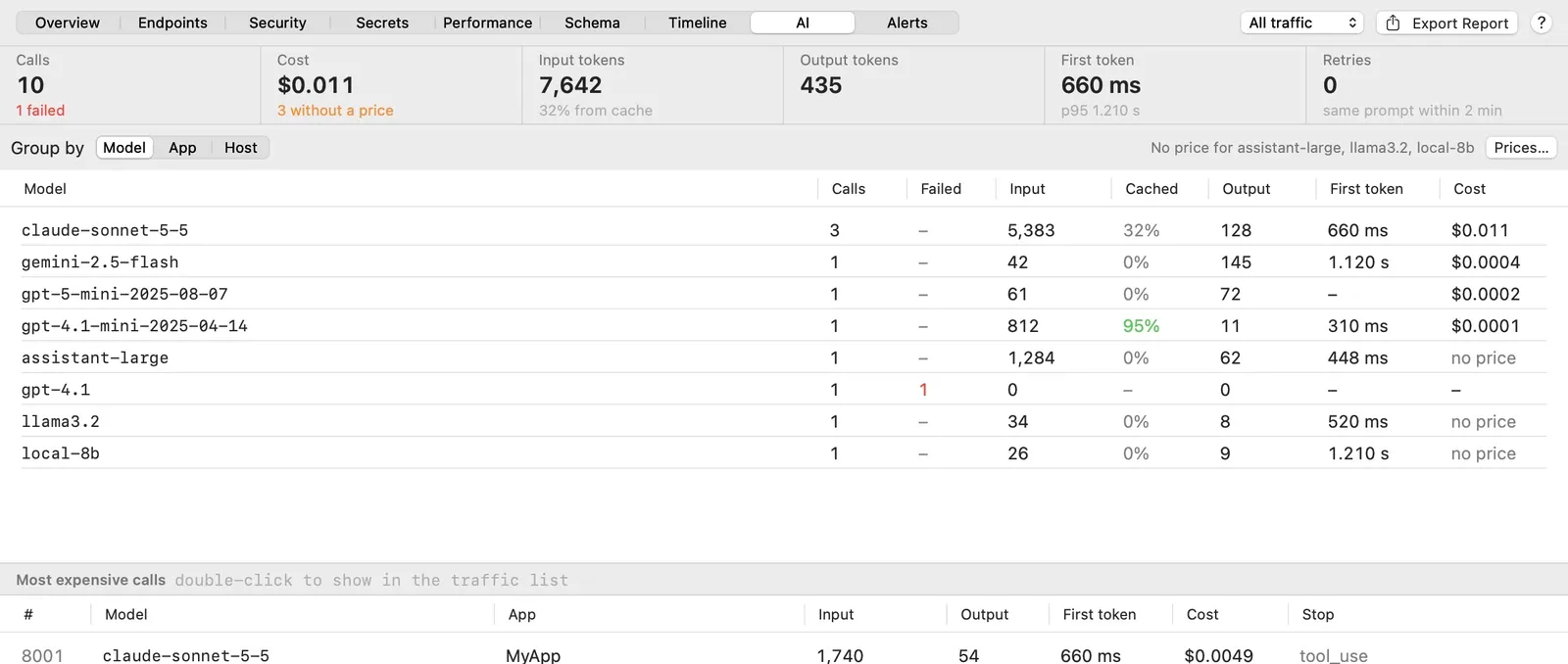
The tiles show calls, failures, cost, the cached share of input, and median and 95th-percentile time to first token. Retries counts calls that repeated an earlier call’s exact prompt within two minutes, which is how a retry loop shows up. Group by switches between Model, App and Host; double-click one of the Most expensive calls to find it in the traffic list.
Check cost in scripts and CI
cloakctl run wraps a command in a proxy, with the proxy and certificate variables set, and records what it sends. cloakctl llm sums up the model calls and can fail a run that spent too much:
cloakctl run --port 9091 --ssl 'api.anthropic.com' --ssl 'api.openai.com' \
  --record agent.cloaksession -- node agent.mjs

cloakctl llm --session agent.cloaksession --calls --max-cost 0.50
--port 9091 avoids the app’s 9090. --max-cost exits with 2 when the total is over budget, or when a model has no price, because then the total can’t be trusted. Pass --prices FILE with a list exported from Prices… so CI doesn’t depend on one Mac’s settings.
Keep your API keys out of what you share
Your API key is in a header (x-api-key, x-goog-api-key or Authorization) of every captured call, shown as captured. Before you export or share a session, turn on Redact secrets in the export panel, or record with cloakctl run --redact. It replaces credential headers and values shaped like OpenAI (sk-…), Anthropic (sk-ant-…) and Google (AIza…) keys with REDACTED. It’s pattern-based and keeps names and emails, so check prompts with customer data yourself. See Redaction.
When to use something else
Cloak Proxy answers “what did this agent just send from my machine?” For anything else:
- Your real bill. Anthropic has Usage and Cost pages in the Console and a Usage and Cost Admin API that splits cached and uncached input. OpenAI has a Prompt Caching dashboard for hit rates.
- Production. Agents on servers never pass through your Mac. Trace them with LangSmith, Langfuse (open source, self-hostable) or OpenTelemetry’s GenAI semantic conventions.
- Your platform. Cloak Proxy is a free native Mac app for macOS 14 and later, notarized by Apple, with a Linux beta. There’s no paid support.
Comparing debugging proxies? See Cloak Proxy alternatives.
Sources
- Prompt caching, Claude API docs: prefix order, invalidation, breakpoints, minimums, TTL, usage fields, prices
- Usage and Cost API, Claude API docs: usage and cost reporting
- Prompt caching, OpenAI API docs: automatic caching, explicit breakpoints, minimum, lifetime, prices,
cached_tokens, dashboard - Chat Completions reference, OpenAI API docs:
stream_options.include_usage,prompt_tokens_details.cached_tokens - Enterprise network configuration, Claude Code docs:
HTTPS_PROXYandNODE_EXTRA_CA_CERTS - Langfuse docs, LangSmith observability and OpenTelemetry GenAI semantic conventions: production tracing
- Cloak Proxy docs: LLM Inspector, Terminal and runtimes, Capture apps that ignore the proxy, SSL Proxying, Streaming responses, cloakctl, Redaction
Checked on 20 October 2026.
FAQ
Is the cost Cloak Proxy shows what I'll be billed?
No. It's an estimate: the token counts the provider reported, multiplied by a price list that ships with the app and can be months old. Batch discounts, priority tiers, server-side tools and contract prices aren't included. Edit the price of any model you rely on, and use your provider's usage and cost pages for billing.
Why does my prompt cache miss when the prompt looks the same?
Usually something early in the prompt changed by a few bytes: a date, a request id, the order of the tools, or a tool description. Other causes: the prompt is shorter than the model's minimum cacheable length, the cache expired (5 minutes by default on Anthropic), or on Anthropic no earlier request wrote a cache entry at that point. The LLM Inspector's Differs from the prompt of #N line shows the first changed character.
Can I inspect Claude Code or another coding agent this way?
Yes, if the agent reads the standard proxy variables and lets you add a CA certificate. Claude Code documents HTTPS_PROXY and NODE_EXTRA_CA_CERTS, so starting it from Cloak Proxy's configured Terminal works. For other agents, check their network or proxy documentation.
Do my prompts or API keys leave my Mac?
No. The LLM Inspector only reads traffic Cloak Proxy already captured on your Mac, and the price list is a local file. API keys are shown as captured, so turn on Redact secrets before you export or share a session.