Subcloak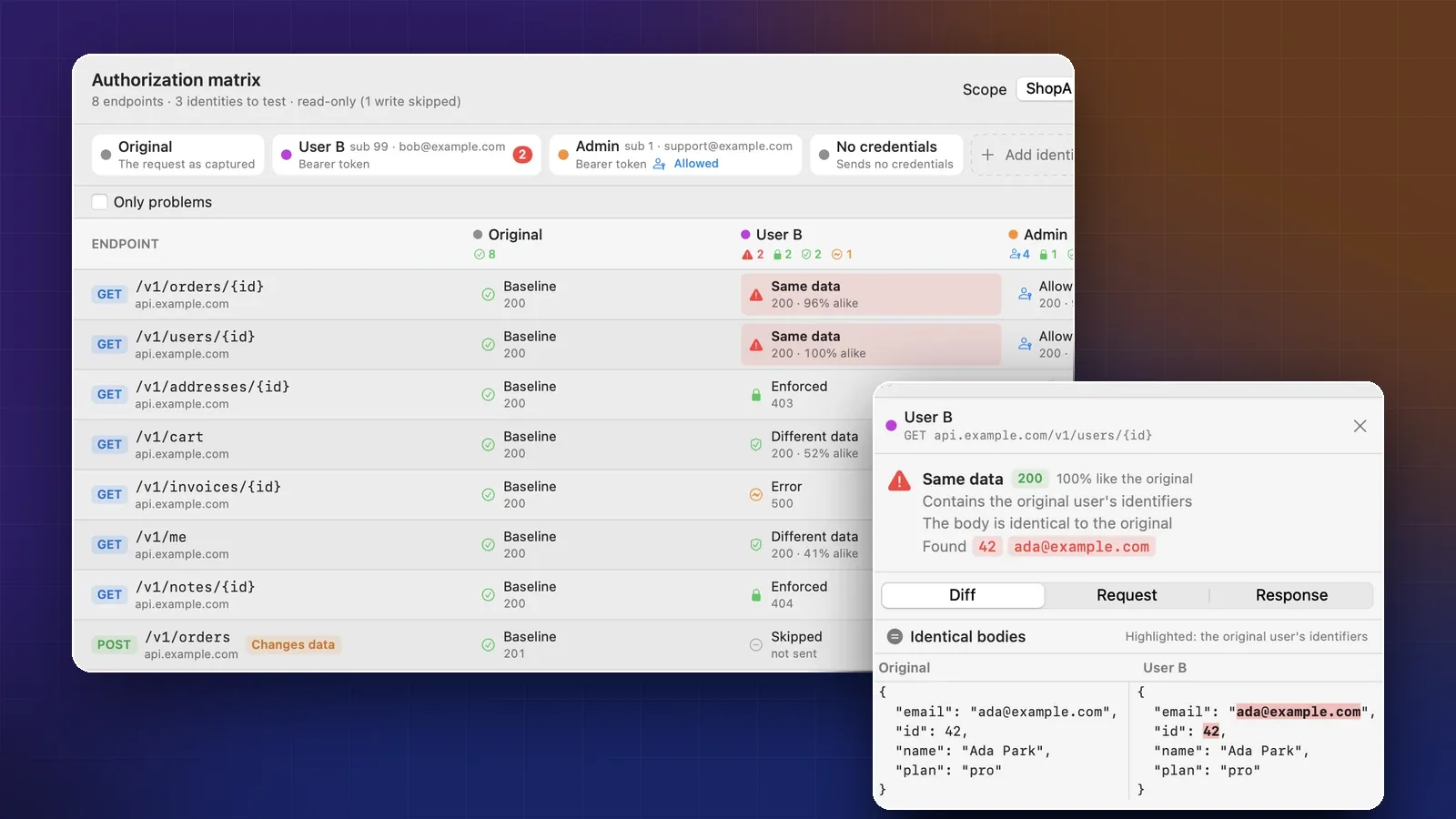
On this page
- What an IDOR looks like
- Why it is the top API risk
- How replaying captured traffic finds it
- Step 1: Capture a journey as user A
- Step 2: Add the identities to test
- Step 3: Run it and read the matrix
- Writes are skipped by default
- Read a Same data finding
- False positives and blind spots
- Run it in CI with cloakctl
- Other ways to test for IDOR
- Sources
- FAQ
You build an API where each user has their own orders, invoices and profile. You’d like to know one thing: if user B asks for user A’s order by its ID, does the server say no? This guide shows how to answer that for every endpoint at once, using traffic you already captured, without writing a test harness first.
You’ll capture a session as one user, replay every request as a second user, an admin and an anonymous caller, and read a table that marks likely leaks in red. Then you’ll run the same check in CI with cloakctl.
What an IDOR looks like
Ada Park signs in to ShopApp and opens her order. The app sends:
GET /v1/orders/1001 HTTP/1.1
Host: api.example.com
Authorization: Bearer <Ada's token>
Now Bob signs in with his own valid token and sends the same request. If the server returns Ada’s order, that’s an insecure direct object reference (IDOR). The token proved who Bob is. Nothing checked whether order 1001 belongs to him.
The bug usually looks like this in code:
// Vulnerable: looks the order up by its ID alone
app.get("/v1/orders/:id", async (req, res) => {
  const order = await db.orders.findOne({ id: req.params.id });
  if (!order) return res.sendStatus(404);
  res.json(order);
});

// Fixed: the query is scoped to the signed-in user
app.get("/v1/orders/:id", async (req, res) => {
  const order = await db.orders.findOne({ id: req.params.id, userId: req.user.id });
  if (!order) return res.sendStatus(404);
  res.json(order);
});
OWASP’s API Security Top 10 calls this Broken Object Level Authorization (BOLA). Its testing guide calls it Insecure Direct Object References. Same bug.
Why it is the top API risk
BOLA is number one in the OWASP API Security Top 10 2023, listed as API1:2023. OWASP rates it easy to exploit, widespread and easy to detect. An attacker only has to change an ID the request already carries. The testing guide covers the same check as WSTG-ATHZ-04.
It slips through for a few reasons:
- Authentication works. Every request has a valid token, so the logs look normal.
- A 200 is not an error. Only someone who knows order 1001 is Ada’s can tell it’s a leak.
- Tests use one user. Most integration tests fetch the signed-in user’s own objects, which always passes.
- The check is per endpoint. One forgotten
userIdfilter in one handler is enough.
Finding it by hand means two accounts and a lot of copying tokens between requests. Replaying captured traffic does the copying for you.
How replaying captured traffic finds it
Cloak Proxy’s Authorization matrix takes requests you captured while signed in as one user, the original user. For each other identity, it strips every credential from the request, adds that identity’s own, and sends it again. Then it compares the response with the one the original user got.
A few details matter for trusting the results:
- Endpoints, not requests.
GET /v1/users/42andGET /v1/users/77become oneGET /v1/users/{id}row, tested by default with the latest request that succeeded (Options › Test every request, not one per endpoint tests them all). - Credentials are swapped completely. The
Authorizationheader, cookies, common API-key headers and auth-looking query parameters are removed first, so a replay carries nothing of the original user. - Replays go straight to the server. Map Local, Rewrite and Breakpoints don’t apply, replays stay out of the traffic list, and redirects to another host aren’t followed.
- Volatile fields are ignored. JSON is compared by shape and values, skipping timestamps, request IDs, nonces and CSRF tokens.
Step 1: Capture a journey as user A
Sign in as a test user and use the app the way a customer would: open orders, view an invoice, edit the profile. The matrix tests only what you captured, so every screen you skip is an endpoint it won’t check.
If you haven’t set up capture yet, see your iPhone app’s network traffic on a Mac covers HTTPS decryption for the Simulator and a real device. To rerun the check later, save the session with File › Save Session… (⌘ S).
Step 2: Add the identities to test
Open the matrix with Tools › Authorization Matrix… (⌥ ⌘ A), or right-click requests, an app or a host and choose Test Authorization….
Two identities are built in. Original is the request exactly as captured, and it’s the baseline. No credentials sends each request with every credential removed, which answers “can an anonymous caller read this?”
Add the others with Add identity:
- User B. A second test account that should never see user A’s data. The quickest way is From a captured request…: sign in as user B in another browser profile, capture one request, and point the editor at it. It copies the
Authorizationheader, session cookies and auth query parameters for you. - Admin. If your app has a support or admin role, add it and turn on Allowed to see other users’ data. Its matches then show as Allowed instead of a red Same data, and they don’t count as problems.
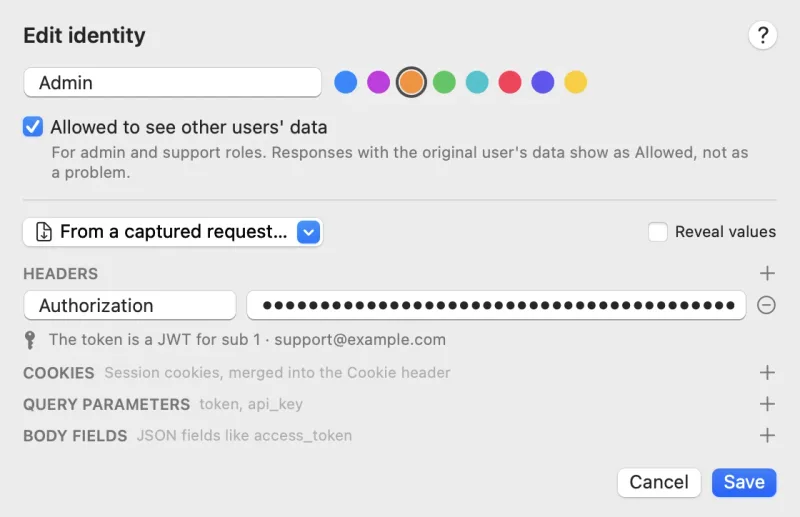
An identity can carry headers, cookies, query parameters and JSON body fields such as access_token. Values stay masked until you tick Reveal values.
Step 3: Run it and read the matrix
Press Run (⌘ ↩). At once (4 in parallel by default) and an optional Requests per second cap in Options keep the load gentle.
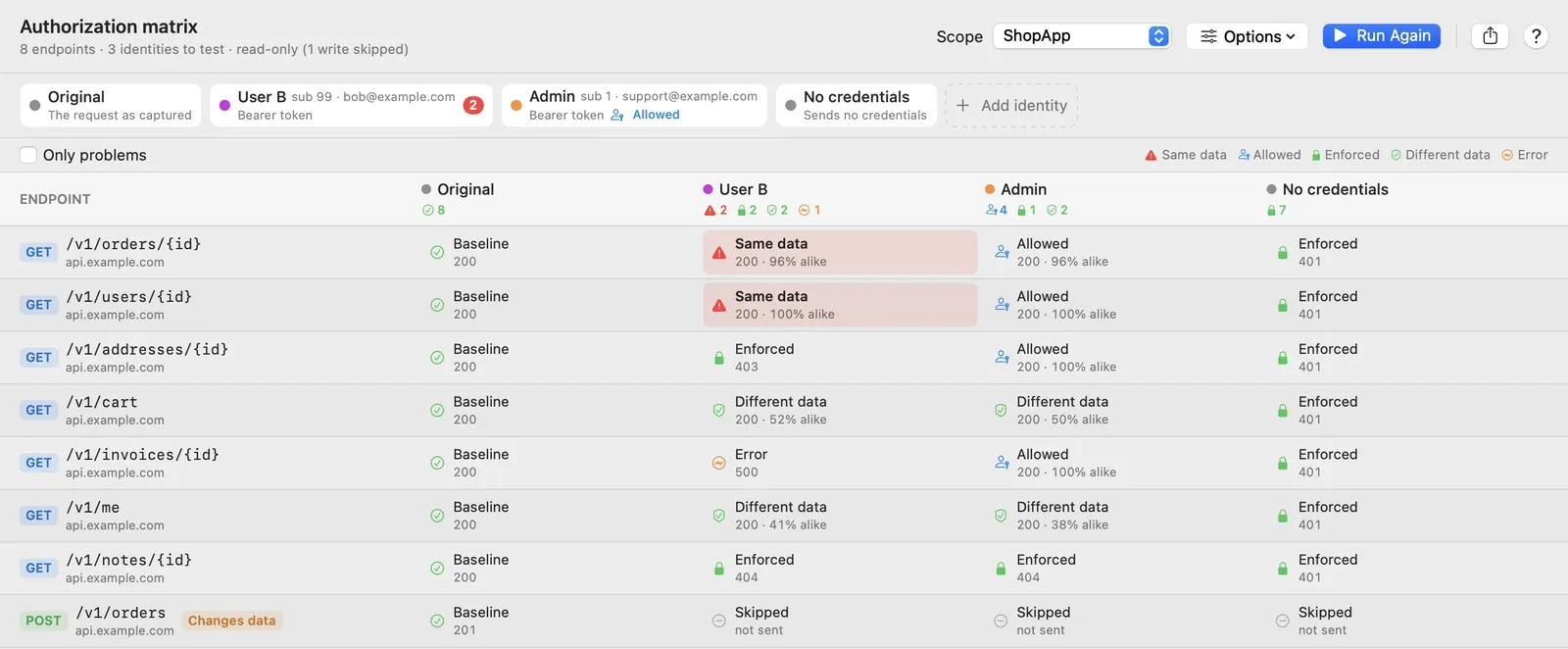
Each cell holds one verdict:
| Verdict | What it means |
|---|---|
| Same data | A 2xx at least 88% alike to the original, or containing the original user’s identifiers. A likely IDOR, tinted red. |
| Allowed | Same data, for an identity allowed to see other users’ data. Expected. |
| Enforced | Access was denied: a 401 or 403, a redirect to a login page, or a 404 where the original got a 2xx. |
| Different data | A 2xx that is clearly different, for example user B’s own cart. Probably fine. |
| Error | A 5xx, a timeout or a connection error, so the server’s answer can’t be judged. |
| Inconclusive | The original request didn’t return data, so there’s nothing to compare. |
| Skipped | Not sent: a write with writes turned off, or an endpoint you excluded. |
In this run, User B gets Ada’s order (96% alike) and her profile (100%). /v1/addresses/{id} answers 403, and /v1/notes/{id} hides the object behind a 404, which counts as Enforced while Treat 404 as enforced is on (the default).
Look at the Error on /v1/invoices/{id} too. A 500 only for another user often means the handler crashes when ownership doesn’t match. Tick Only problems to hide every row without a Same data cell.
Writes are skipped by default
GET, HEAD and OPTIONS run by default. POST, PUT, PATCH and DELETE get a Changes data pill and are Skipped, because replaying them changes data on the server. To test them, turn on Options › Include requests that change data, which asks you to confirm. Do that only against a disposable test environment. To leave out any single endpoint, right-click it and choose Exclude from Runs.
Read a Same data finding
Click a red cell to open its detail pane.
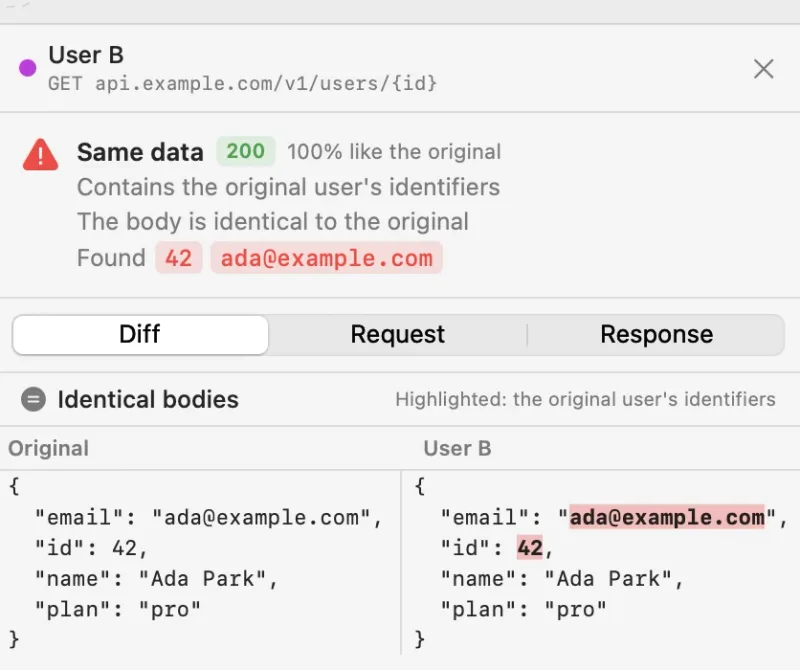
Under Found are the original user’s identifiers that appeared in this response: Ada’s ID 42 and ada@example.com. The matrix learns them from her JWT subject, email or username, and the ID in a captured /me or profile response. Then three tabs:
- Diff shows the two responses side by side, with changed lines tinted and the original user’s identifiers highlighted.
- Request shows exactly what was sent, with the substituted credential headers highlighted. Check that the token really is user B’s.
- Response shows the full status, headers and body.
Before you file the bug, reproduce it once outside the tool:
curl -s https://api.example.com/v1/users/42 \
  -H "Authorization: Bearer $USER_B_TOKEN"
If that prints Ada’s email, the finding is confirmed. The share menu exports the run as Markdown, CSV or JSON. Markdown lists the vulnerable endpoints first, which suits a bug report, and every export masks the original user’s identifiers.
False positives and blind spots
Same data is a strong signal, not proof. Read each red cell before you file it.
- Public resources. A product catalog returns the same body to everyone, so it looks alike. Check the reasons: a public response won’t contain the original user’s identifiers.
- Shared data. If A and B share a team or workspace, B may be allowed to read A’s projects. Pick a user B in a different organization or tenant.
- Noisy fields. A field that changes on every response can drag similarity down and hide a leak. Add its JSONPath in Options › Ignore Fields…, for example
$.meta.generatedAt. - Expired tokens. If the Original replay now gets a 401 or 403, the matrix shows The captured session’s credentials have expired. instead of reporting everything as enforced. Capture again and rerun.
And remember what it can’t see: endpoints the capture never touched, and writes unless you include them. A clean matrix means the captured reads look right, not that the API is safe.
Run it in CI with cloakctl
cloakctl authz runs the same matrix without the window, against a saved .cloaksession or .har file. Record the journey and test it in the same job, so the original user’s token is still valid:
# 1. Record your end-to-end tests, signed in as user A
cloakctl run --port 9091 --ssl 'api.example.com' \
  --record journey.cloaksession \
  -- npm run test:e2e

# 2. Replay every read as user B, an admin and no credentials
cloakctl authz --session journey.cloaksession \
  --identity "User B=Authorization: Bearer $USER_B_TOKEN" \
  --identity "Admin=Authorization: Bearer $ADMIN_TOKEN;allowed" \
  --identity anonymous \
  --fail-on vulnerable --format markdown --out authz.md
An --identity can be a header, Name=Cookie: session=…, Name=?token=…, or anonymous. The ;allowed suffix marks an admin role. Add --host, --app, --ignore-field, --every-request or --include-writes as needed. The exit code tells the job what happened:
| Exit code | Meaning |
|---|---|
0 |
The run finished and no identity got the original user’s data (or --fail-on wasn’t given) |
1 |
An error, such as an unreadable session or a bad --identity |
2 |
With --fail-on vulnerable, at least one Same data cell |
Don’t pass --redact here: the matrix needs the original user’s real token to send the baseline. So the recording holds live test credentials; don’t upload it as a build artifact. cloakctl needs a macOS runner, or the Linux beta’s headless mode.
Other ways to test for IDOR
- Burp Suite with Autorize. If you already test in Burp, Autorize does the same core job: browse as a high-privileged user, give it a low-privileged cookie or header, and it labels each replay Bypassed!, Enforced! or Is enforced???. It’s free, with its source on GitHub, needs Jython, and its README lists both Burp Community and Professional.
- AuthMatrix. AuthMatrix is another Burp extension. You define tables of users, roles and requests and run every combination, which suits role-heavy apps. Its BApp page was last updated in October 2021.
- Authorization tests in your own suite. This is the best long-term fix. For each endpoint that takes an ID, write a test that creates an object as user A and fetches it as user B, and expect a 403 or 404. OWASP’s own advice for API1 is to write such tests and not deploy changes that make them fail.
Whatever finds the bug, the matrix shows symptoms and the fix belongs in code: an object-level check wherever a record is loaded by an ID from the client. The safest place is the data-access layer, where every query is scoped to the caller, so a new endpoint can’t forget it. OWASP also suggests random, unpredictable IDs, which make guessing harder but don’t replace the check.
Fix the leak, add a regression test, and keep cloakctl authz in CI for the next endpoint that forgets. Cloak Proxy is free, a native Mac app for macOS 14 or later, notarized by Apple, with a Linux beta. There’s no paid support.
Sources
- API1:2023 Broken Object Level Authorization: BOLA’s ranking, how it is exploited, its risk ratings and OWASP’s prevention advice
- WSTG-ATHZ-04 Testing for Insecure Direct Object References: the testing guide’s definition of IDOR
- Autorize on the PortSwigger BApp Store: what Autorize does, its author and version 1.9.4
- Autorize on GitHub: status labels, Jython requirement and supported Burp editions
- AuthMatrix on the PortSwigger BApp Store: how AuthMatrix works and its last update
- Cloak Proxy docs: Authorization matrix: identities, verdicts, options, writes and
cloakctl authz - Cloak Proxy docs: cloakctl:
cloakctl authzexit codes - Cloak Proxy docs: Headless runs and CI:
cloakctl run --record,--redactand runner requirements
Checked on 20 October 2026.
FAQ
Is IDOR the same as BOLA?
Yes, for practical purposes. OWASP's API Security Top 10 calls it Broken Object Level Authorization (API1:2023); the OWASP Web Security Testing Guide calls it Insecure Direct Object References (WSTG-ATHZ-04). Both describe a server that returns or changes an object without checking that the caller may access that object.
Will the Authorization matrix change data on my server?
Not by default. Only GET, HEAD and OPTIONS are replayed. POST, PUT, PATCH and DELETE are skipped unless you turn on Include requests that change data, which asks you to confirm. Read requests still reach the real server, so use a test environment where you can.
Can I run it on a HAR file from another tool?
Yes. cloakctl authz --session accepts a .cloaksession or a .har file. The HAR must still hold the original user's credentials, so don't redact it first.
Does a clean matrix mean my API has no access control bugs?
No. It only tests the endpoints your capture touched, it skips writes unless you include them, and it can't see function-level bugs on endpoints the original user never called. Treat it as a fast first pass and a regression net, alongside authorization tests in your own suite.