Subcloak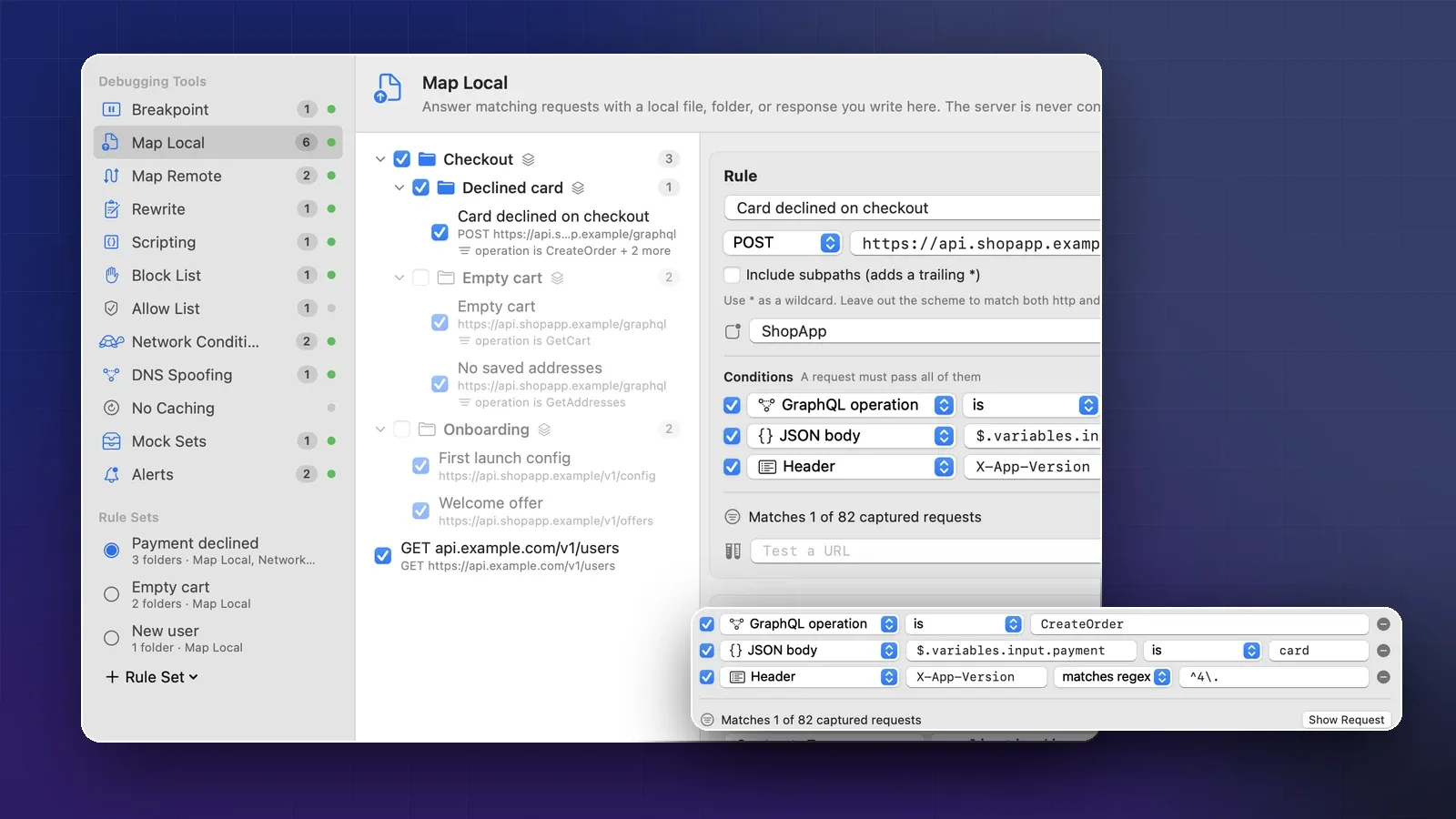
On this page
- Before you start
- How Map Local works
- Mock a response from a captured request
- Recipes for the states you need to test
- A server error (500)
- An expired session (401)
- An empty list
- A slow response
- A broken response
- Mock one GraphQL operation
- Record a whole API with Mock Sets
- Switch between scenarios with rule sets
- Share mocks with your team
- When stubs in code are the better choice
- Turn the mocks off
- Sources
- FAQ
You need to see how your app’s order screen looks when the list is empty. Or when the server returns a 500. Or when the session has expired and the API says 401. Getting the real backend into those states is slow, and adding #if DEBUG stubs to the app means changing code you’ll have to remember to remove.
A debugging proxy can answer the request instead. The app sends its normal request, the proxy replies with the JSON you wrote, and the app never knows the difference. This guide shows how to do that in the iOS Simulator with Map Local in Cloak Proxy, our free Mac app, and when stubs in code are the better choice.
Before you start
You need Cloak Proxy capturing the Simulator, with your API’s host decrypted. That takes about five minutes:
- Turn on the macOS proxy with ⇧ ⌘ P. Simulators use the Mac’s network settings.
- Click Devices in the toolbar, choose iOS Simulator, and click Install Certificate on All Booted Simulators. Restart your app in the simulator.
- Add your API’s host, such as
api.example.com, in Cloak Proxy › Settings… › SSL Proxying.
If you haven’t done this before, our guide to seeing your iPhone app’s network traffic walks through it, including real devices.
How Map Local works
Map Local is a list of rules. Each rule matches requests by method and URL, and optionally by app, header, query parameter, JSON body value or GraphQL operation. When a request matches, Cloak Proxy answers it with the rule’s status code, headers and body. The server is never contacted.
Map Local runs before Mock Sets and Map Remote, so a matching rule always wins. The mocked response still passes through the tools that act on responses, so you can slow it down with Network Conditions or pause it at a breakpoint.
Mock a response from a captured request
The fastest way to write a mock is to start from the real thing.
- Use the screen in your app once, so the request appears in Cloak Proxy’s traffic list.
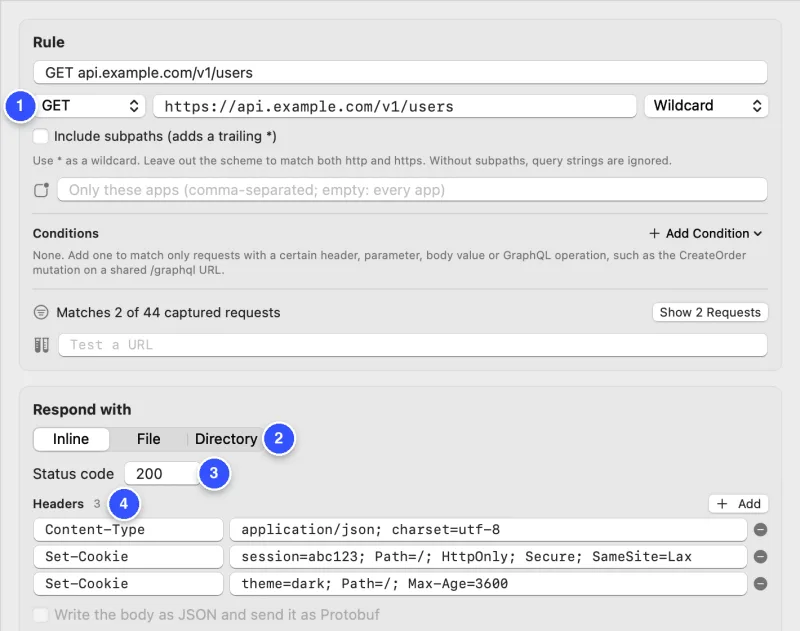
- Right-click the request and choose Tools › Map Local…. Cloak Proxy creates a rule that matches the request’s method and URL, copies the captured response into it, turns Map Local on and opens the rule.
- Under Respond with, edit the status code, headers or body.
- Make the request again in the app: pull to refresh, or leave the screen and come back. The row in the traffic list now has a
Map Localbadge.
A few details save confusion later:
- The query string is ignored. Without Include subpaths, the rule matches the same path with any query, so
/v1/orders?page=2uses the same mock as/v1/orders. - Only useful headers are copied:
Content-Type,Cache-Control,Set-Cookie,Location,Content-Disposition,WWW-Authenticate,Retry-Afterand anyAccess-Control-*headers. Server and CDN headers are left out. - The body is decompressed and JSON is pretty-printed, so you can edit it as text. Cloak Proxy sets
Content-Lengthfor you, so don’t add one. - Caches can hide your change. If the app keeps showing the old data, turn on Tools › No Caching so it asks again instead of reusing a cached copy.
Recipes for the states you need to test
Each recipe is a change to the same rule. Make one rule per state and switch them on and off; later, folders and rule sets do the switching for you.
A server error (500)
Set Status code to 500 and replace the body:
{ "error": "internal", "message": "Something went wrong on our side." }Check that the app shows a friendly error, keeps the last good data if it should, and offers a retry.
An expired session (401)
Set the status to 401 and add a header your client might read:
WWW-Authenticate: Bearer error="invalid_token"A good app refreshes its token once and repeats the request, or signs the user out cleanly. Watch the traffic list: if you see the same 401 request repeated dozens of times, you’ve found a retry loop.
An empty list
Keep the status at 200 and return an empty collection in the shape your API uses:
{ "orders": [], "next": null }This is where empty-state screens and “Load more” buttons tend to break.
A slow response
Map Local answers instantly, which hides loading states. Add a Network Conditions rule for the same host: right-click the request and choose Tools › Network Conditions…. Mocked responses skip the upload delay but still get the download delay, which is half the profile’s latency plus the body’s transfer time. So for a delay of about three seconds, type a custom Latency of 6000 ms. Now you can see your spinner, skeleton screen or timeout.
A broken response
Leave a brace out of the body. The editor warns Invalid JSON, but the rule sends exactly what you wrote. A crash here means the app trusts its decoder too much.
Mock one GraphQL operation
GraphQL sends every operation to one URL, often POST /graphql, so a rule that matches only the URL would answer every query and mutation with the same body. Conditions fix this.
Right-click a GraphQL request and choose Tools › Map Local…. The new rule already has a GraphQL operation is … condition and is named after the operation, such as mutation CreateOrder. To narrow it further, click Add Condition and choose JSON Body Value (JSONPath), Request Header, Query Parameter, Body Text or GraphQL Operation Type.
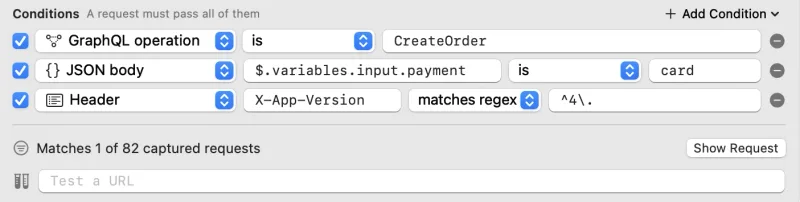
The rule above answers only the CreateOrder mutation, only when the payment method is a card, and only from app versions starting with 4. GraphQL servers usually report failures with a 200 and an errors array, so the mock does too:
{
  "data": { "createOrder": null },
  "errors": [
    {
      "message": "Your card was declined.",
      "path": ["createOrder"],
      "extensions": { "code": "PAYMENT_DECLINED" }
    }
  ]
}
Cloak Proxy recognizes this shape. The row shows a red 200 ✕, and the inspector shows the error above the response.
Record a whole API with Mock Sets
Map Local is for the one response you want to change. When you want everything the way it was at one moment, for example to demo the app on a plane or keep working while staging is down, use a mock set.
Use the app so Cloak Proxy captures the screens you need. Then right-click the domain in the sidebar and choose Mock api.example.com Offline (the item shows your domain’s name). Every captured response from that host becomes a recording, and requests are answered from it.
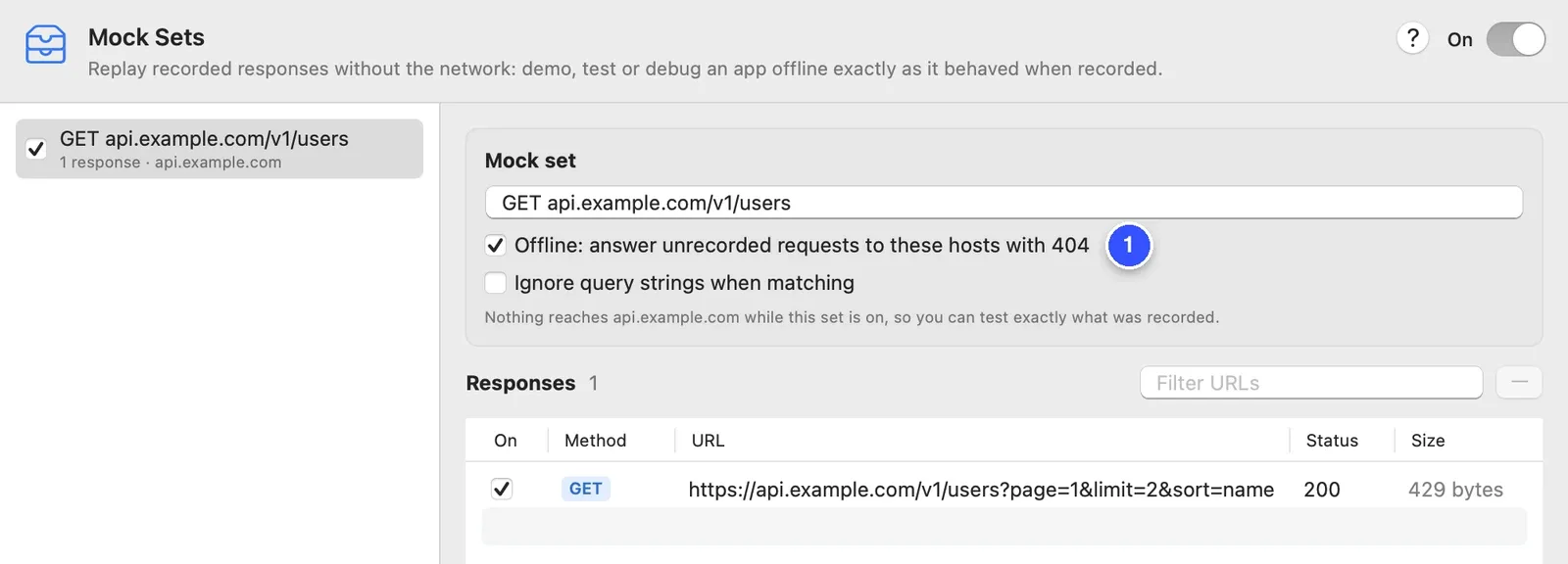
With Offline on, a request you didn’t record gets a 404 with the header X-Cloak-Proxy: mock-miss, so you can spot screens you missed. GraphQL recordings remember their operation, so GetUser gets the GetUser recording and GetCart the GetCart one, even though both went to /graphql. You can edit any recorded status, header or body in the window.
Switch between scenarios with rule sets
After a week you’ll have rules for “card declined”, “empty cart”, “first launch” and more. Turning them on and off one by one gets old. Put each scenario’s rules in a folder, then save folders as a rule set.
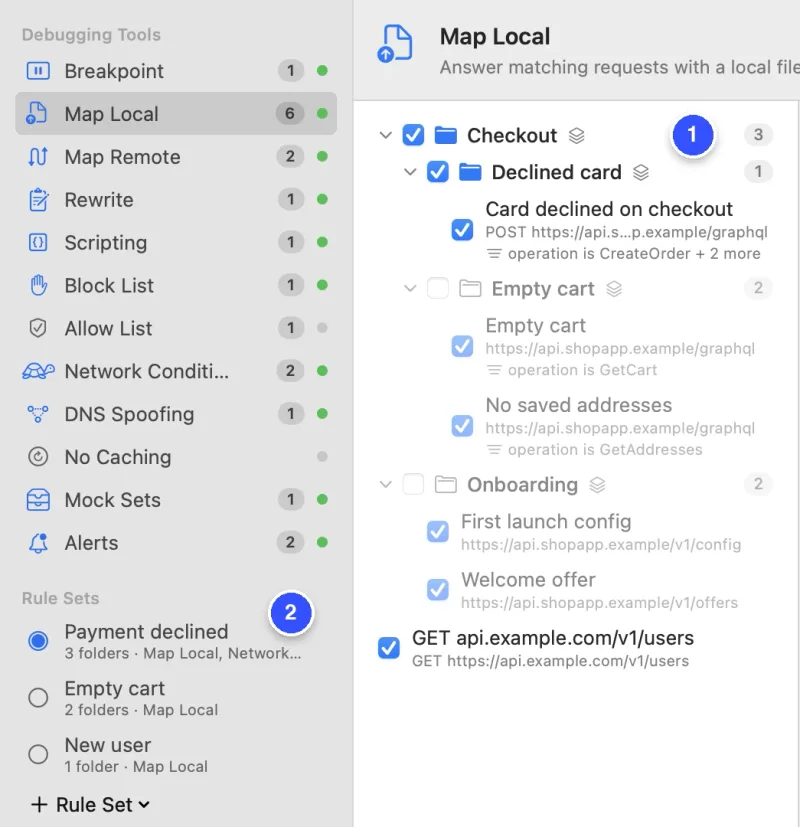
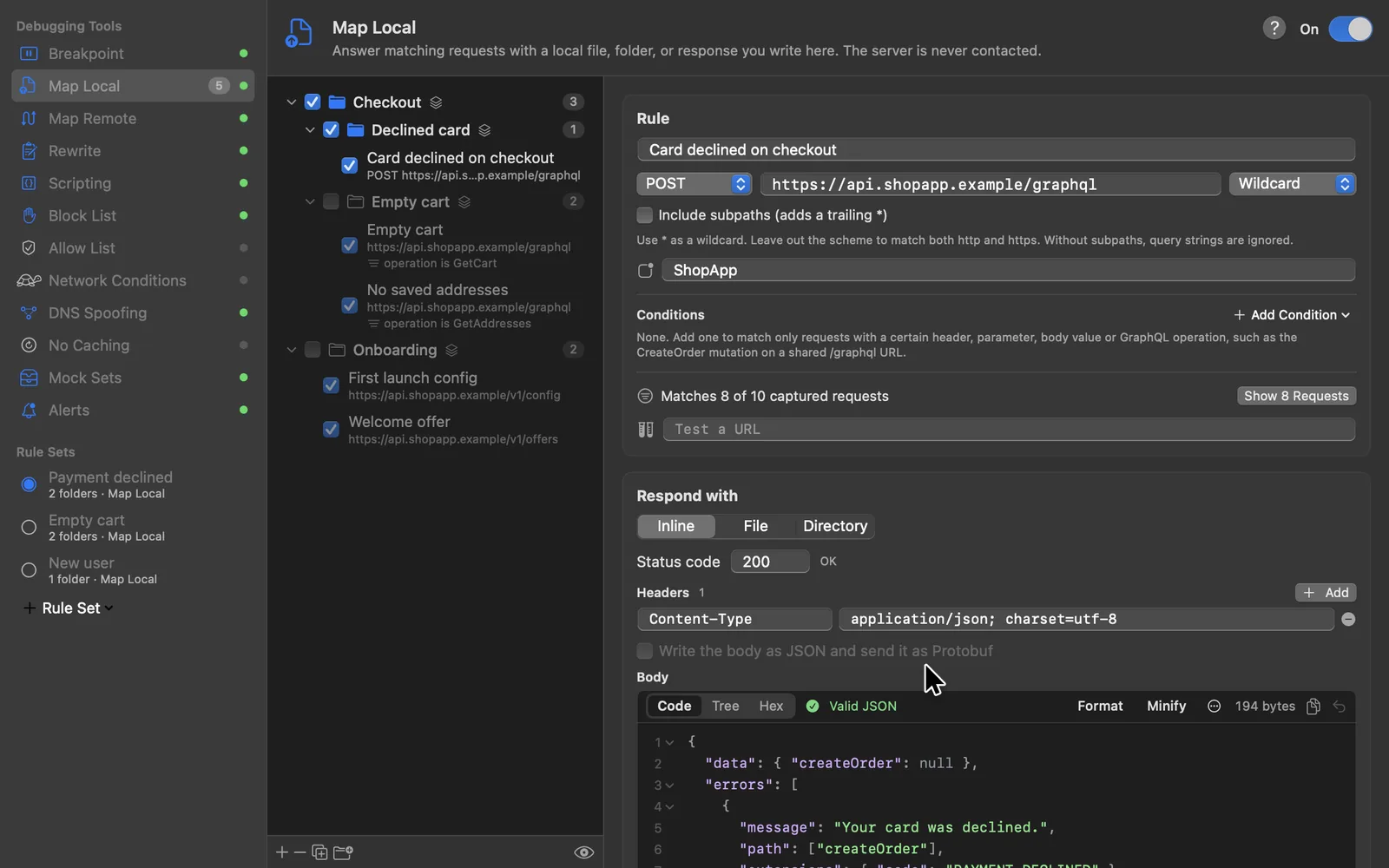
- In the rule list, click the new-folder button and drag the rules into it.
- Turn on the folders that make up a scenario, in any tools: for example a Map Local folder that declines the card and a Network Conditions folder that slows checkout.
- Under Rule Sets in the sidebar, click Rule Set and choose New Set from Folders That Are On…. Name it
Payment declined.
Switching to a set turns on its folders, turns off folders that belong to other sets, and leaves everything else alone. You can switch from the sidebar or from the N tools on button in the bottom bar.
Share mocks with your team
Right-click a set and choose Export Set… (or Export Folder… on a folder). You get a rules file with just those folders, their rules and the set. A teammate imports it with Tools › Import Rules…; importing an updated file again replaces the old rules instead of duplicating them.
Keep these files next to your app’s code, and the scenarios travel with the branch that needs them. In a test script, cloakctl switches sets against the running app:
cloakctl rules import mocks/payment-declined.json
cloakctl rules set activate "Payment declined"
# run your UI tests here
cloakctl rules set offWhen stubs in code are the better choice
Proxy mocks are best for looking: trying a state by hand, showing a designer the error screen, letting QA walk through “payment declined” on a real build. They change nothing in the app, so they work with any build, and other people can use them without touching the code.
For automated tests, stub in code. Tests in CI should be hermetic: they shouldn’t depend on a proxy running on the machine, a trusted certificate or the order rules were switched on. Apple’s networking has a hook for this: a URLProtocol subclass, registered on the session’s configuration, can answer requests itself.
final class StubProtocol: URLProtocol {
    nonisolated(unsafe) static var stubs: [String: (status: Int, body: Data)] = [:]

    override class func canInit(with request: URLRequest) -> Bool {
        stubs[request.url?.path ?? ""] != nil
    }
    override class func canonicalRequest(for request: URLRequest) -> URLRequest { request }

    override func startLoading() {
        let url = request.url!
        let stub = Self.stubs[url.path]!
        let response = HTTPURLResponse(url: url, statusCode: stub.status, httpVersion: "HTTP/1.1",
                                       headerFields: ["Content-Type": "application/json"])!
        client?.urlProtocol(self, didReceive: response, cacheStoragePolicy: .notAllowed)
        client?.urlProtocol(self, didLoad: stub.body)
        client?.urlProtocolDidFinishLoading(self)
    }
    override func stopLoading() {}
}

// In a test
let config = URLSessionConfiguration.ephemeral
config.protocolClasses = [StubProtocol.self]
StubProtocol.stubs["/v1/orders"] = (500, Data(#"{"error":"internal"}"#.utf8))
let session = URLSession(configuration: config)
This needs your networking code to accept an injected URLSession, which is good design anyway. Libraries such as OHHTTPStubs wrap the same idea with a friendlier API, but check whether a dependency is still maintained: its last release, 9.1.0, is from December 2020.
A practical split: explore and design with proxy mocks, then write the cases you care about as stubbed tests. The JSON you wrote in Map Local makes a good fixture.
Turn the mocks off
Map Local keeps answering until you turn it off, even after a restart. When the app shows data you didn’t expect, look at the N tools on button in Cloak Proxy’s bottom bar: hover it to see which tools have active rules, and click to turn them off.
Sources
- Apple: URLProtocol.
- OHHTTPStubs on GitHub (release history).
- Proxyman: Map Local and GraphQL rules; Charles: Map Local, for the same technique in other tools.
- Cloak Proxy docs: Map Local, Conditions and GraphQL, Mock Sets, Rule folders and sets and Network Conditions.
Checked on 19 October 2026.
FAQ
Does Map Local work on a real iPhone too?
Yes. Once the iPhone uses your Mac as its Wi-Fi proxy and trusts the certificate, Map Local rules answer its requests the same way. See how to see your iPhone app's traffic.
Will a mock affect other apps on my Mac?
Only if they call the same URL. A rule matches every app by default; type your app's name in the rule's Only these apps field to limit it, for example ShopApp.
Will my mocks still be on tomorrow?
Yes. Rules stay on after a restart until you turn them off. If the app shows stale data, check the N tools on button in Cloak Proxy's bottom bar.
Is this a replacement for stubs in my unit tests?
No. Proxy mocks are for exploring, design review and manual QA. Tests that run in CI should stub in code so they don't depend on a proxy running on the machine.