Subcloak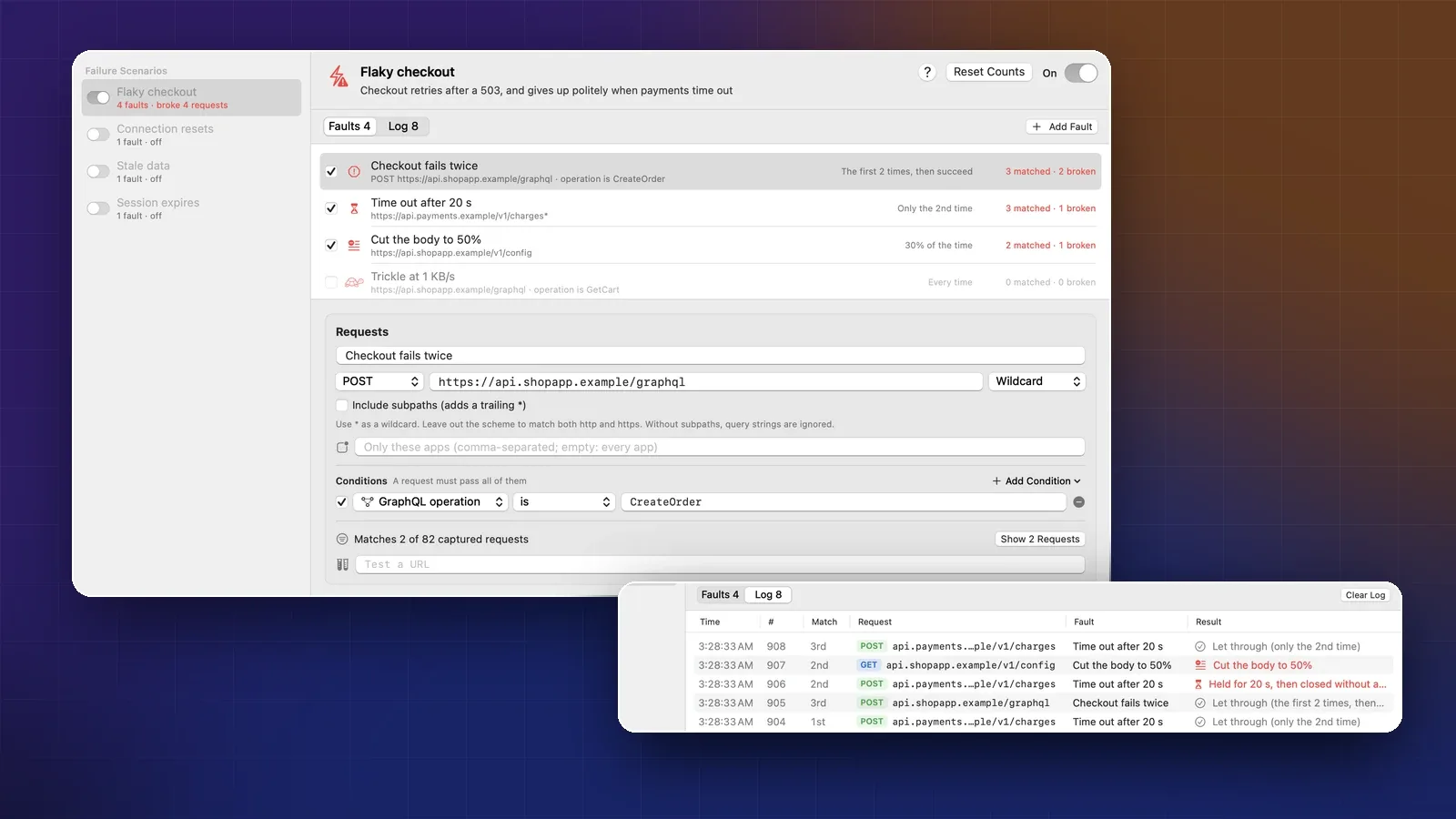
On this page
- Slow is not the same as broken
- Where each fault acts
- The checklist
- 1. It fails twice, then works
- 2. The server is down
- 3. No answer at all
- 4. The connection is reset
- 5. The body stops halfway
- 6. A response that trickles in
- 7. Stale data
- 8. The session expires mid-use
- Read what happened
- Run the same failures in CI
- Already using Toxiproxy?
- When to shape the whole device’s network
- Sources
- FAQ
Most apps are tested on office Wi-Fi against a server that always answers. Users are on trains and in lifts, and the bugs they hit aren’t “it’s a bit slow”. They’re a spinner that never stops, a checkout that charges twice after a retry, a crash on half a JSON document, or a draft lost when a token expires.
This is a checklist of eight failures worth causing on purpose, what good app behavior looks like for each, and how to trigger each one on demand, locally and in CI. The examples use Failure Scenarios in Cloak Proxy, our free debugging proxy for Mac (with a Linux beta). We also say when Toxiproxy, Network Link Conditioner or the Android emulator is the better choice.
Slow is not the same as broken
Throttling makes traffic slower, and some tools also drop a share of it at random. Cloak Proxy’s Network Conditions and Apple’s Network Link Conditioner do both; the Android emulator’s speed and delay options only slow it down. They’re good for loading states, and poor at testing error handling, because you can’t say “fail this request twice, then let it through”.
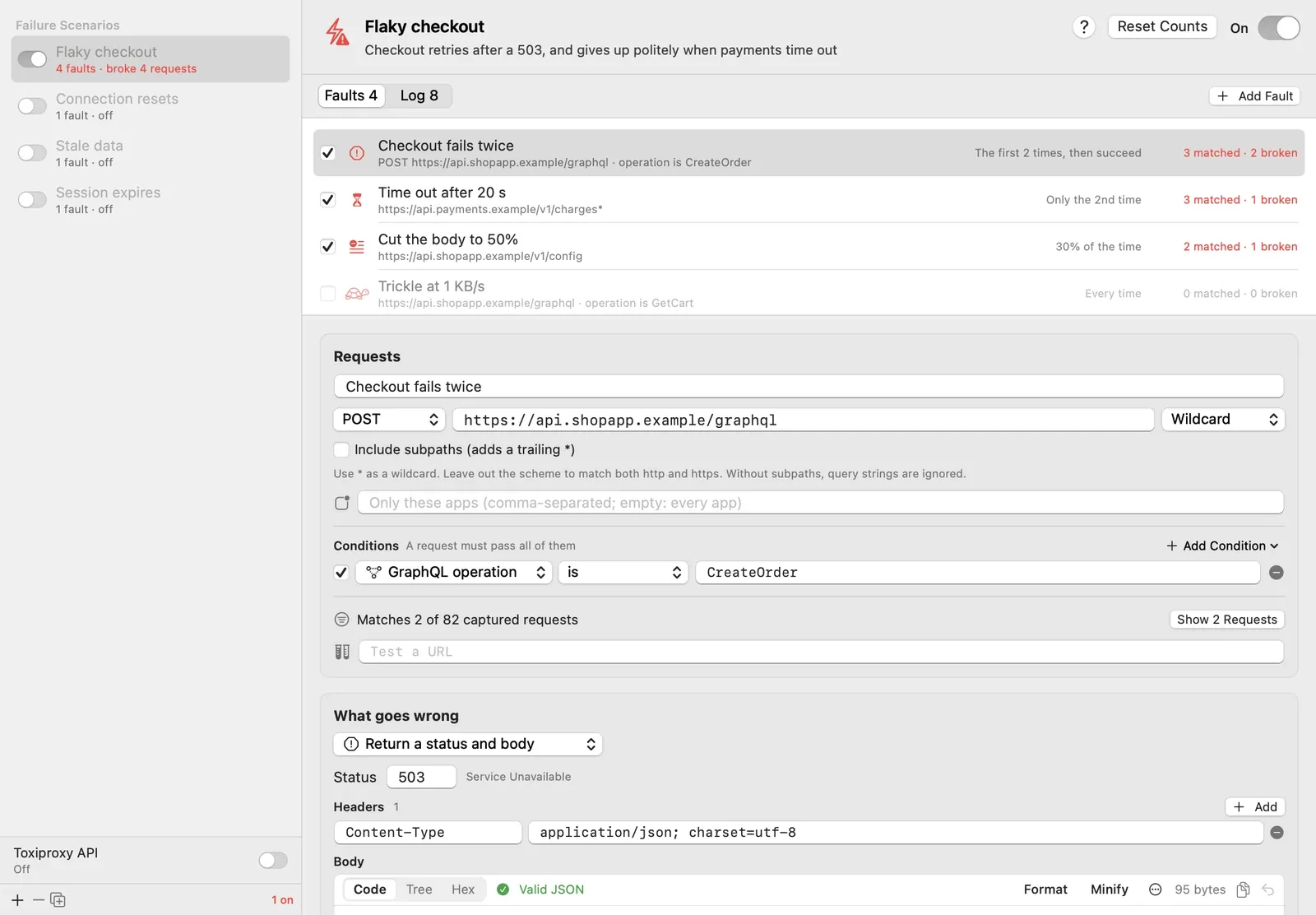
Fault injection breaks specific requests in specific ways, on a schedule. In Cloak Proxy 0.4.0 and later, that’s Failure Scenarios. A scenario is a named group of faults that you switch on and off together, such as “Flaky checkout”. Each fault has three parts:
- Requests: a URL pattern, a method, optionally the apps it applies to, and conditions such as GraphQL operation is CreateOrder.
- What goes wrong: one of eight faults, from Return a status and body to Serve stale data.
- When: Every time, The first N times, then succeed, After N successes, Only the Nth time, or A percentage of the time.
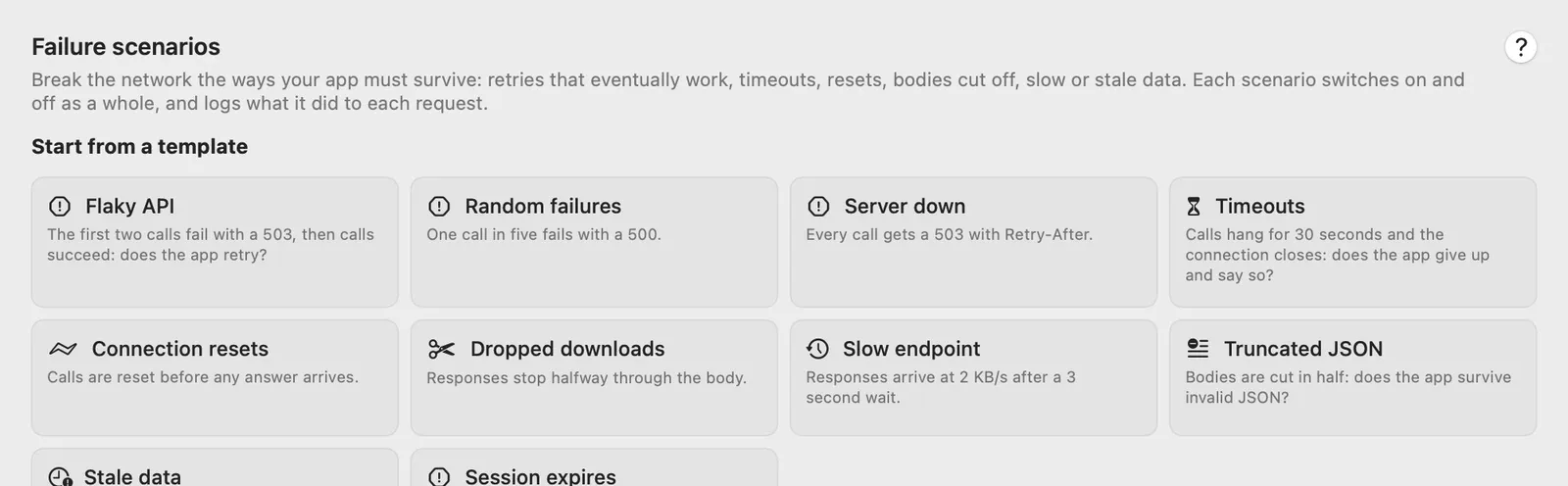
To start, choose Tools › Failure Scenarios… (⌥ ⌘ F; Ctrl Alt F on Linux) and pick a template. Or right-click a captured request and choose Simulate a Failure… to get a scenario whose fault matches that request (and its GraphQL operation) and fails it twice before letting it through.
Your app’s traffic has to go through Cloak Proxy, with HTTPS decrypted for the host, so faults can read the URL and body. If you haven’t set that up, see your iPhone app’s traffic on a Mac first.
Switching a scenario on starts its counts from 1 and clears its log, so “the first 2 times” means the first two matching requests after that. Reset Counts does the same while it stays on.
Where each fault acts
That matters for safety: a status fault on a payment call never reaches the payment provider, but a Truncate the body fault does, so the charge happens and only the app’s copy of the answer is broken.
The checklist
1. It fails twice, then works
Fault: Return a status and body (default 503 with a JSON error). When: The first N times, then succeed, with N set to 2. This is the Flaky API template.
Good behavior: the app retries on its own with exponential backoff, keeps one spinner up, and never flashes an error. It stops after a few attempts.
Narrow the fault with a condition, such as GraphQL operation is CreateOrder. Retrying a POST is only safe if the server can tell a retry from a new order, for example with an idempotency key: this 503 never reached your server, but a real one might arrive after the order was saved. Only the Nth time with N set to 2 breaks just the second CreateOrder, a good way to test a double tap on Pay.
2. The server is down
Fault: the Server down template answers every call with a 503 and a Retry-After: 30 header. Random failures fails one call in five with a 500.
Good behavior: the app gives up after a few tries, honors Retry-After, and shows an error that says what happened, with a way to try again. Cached content stays on screen. With Random failures, look for screens that go blank when one of several calls fails.
3. No answer at all
Fault: Time out. The app gets no answer; after the wait (default 30 seconds), the connection closes. Template: Timeouts.
Set the wait longer than the app’s own timeout, so the app gives up first. URLSession’s timeoutIntervalForRequest defaults to 60 seconds, longer than the template’s 30, so try 90.
Good behavior: the app gives up at a time you chose, says so in plain words, and offers a retry. If the spinner is still turning when the fault closes the connection, that’s your bug. The traffic list shows Timed out: no answer for N s.
4. The connection is reset
Fault: Reset the connection. The connection is reset (a TCP RST) before any answer arrives, as when a load balancer or a mobile network drops it. Template: Connection resets.
Good behavior: a quick retry for safe requests such as a GET, the same idempotency care as above for anything that changes data, and never a raw error code on screen. The traffic list says Connection reset by failure scenario “…”.
One limit: HTTP/2 carries many requests on one connection, so Cloak Proxy closes the request’s stream instead, which your client may report differently.
5. The body stops halfway
- Drop the connection mid-body sends the real headers and part of the body (default 50%), then closes the connection. The body is shorter than its
Content-Length, so the HTTP client should report an error. Template: Dropped downloads. The traffic list shows Connection dropped after N of M bytes. - Truncate the body cuts the body short and fixes
Content-Lengthto match. It’s valid HTTP with broken JSON or a broken image, so the networking layer reports success and your parser is the only defense. Template: Truncated JSON.
Good behavior: a decoding error is shown as an error, not a crash or a blank screen. Broken data isn’t cached. Images fall back to a placeholder, and downloads restart instead of saving a corrupt file. Set When to A percentage of the time, say 30%, on a feed endpoint and use the app for a few minutes.
6. A response that trickles in
Fault: Trickle the response slowly (default 2,048 bytes per second). The Slow endpoint template pairs it with Delay the request (3 seconds), so responses arrive at 2 KB/s after a 3-second wait.
Good behavior: progress bars for large downloads, skeleton screens, a cancel button, and the freedom to leave the screen. URLSession’s request timer resets whenever data arrives, so a trickle won’t trip it, but a hand-written “give up after 10 seconds” will kill a download that was working.
Use this fault, not Network Conditions, to test progress UI: Network Conditions holds the whole response, then sends it in one go (only streamed responses such as SSE arrive part by part).
7. Stale data
Fault: Serve stale data. The first response seen after the scenario went on is served again and again, as if a cache never refreshed. Requests are told apart by method, URL and GraphQL operation. Template: Stale data.
Good behavior: after the user changes something, the screen shows the change even if the next fetch is out of date, using the mutation’s own response or an optimistic update. Old data says how old it is. This fault finds screens that ignore what they just saved.
8. The session expires mid-use
Fault: Return a status and body with status 401, When: After N successes. The Session expires template lets three calls work, then answers every call with a 401.
Good behavior: one token refresh, not one per request in flight, then a retry of the original request. If that fails, one trip to sign-in that keeps unsaved work.
If the fault covers api.example.com/v1/* and tokens come from auth.example.com, the refresh succeeds but later calls still fail: you’re testing the “refresh didn’t help” path. For one expired token followed by a successful refresh, switch When to Only the Nth time.
Read what happened
Each fault shows how many requests it matched and broke. The Log tab lists every matched request, newest first: red when broken, grey when let through, with the reason.
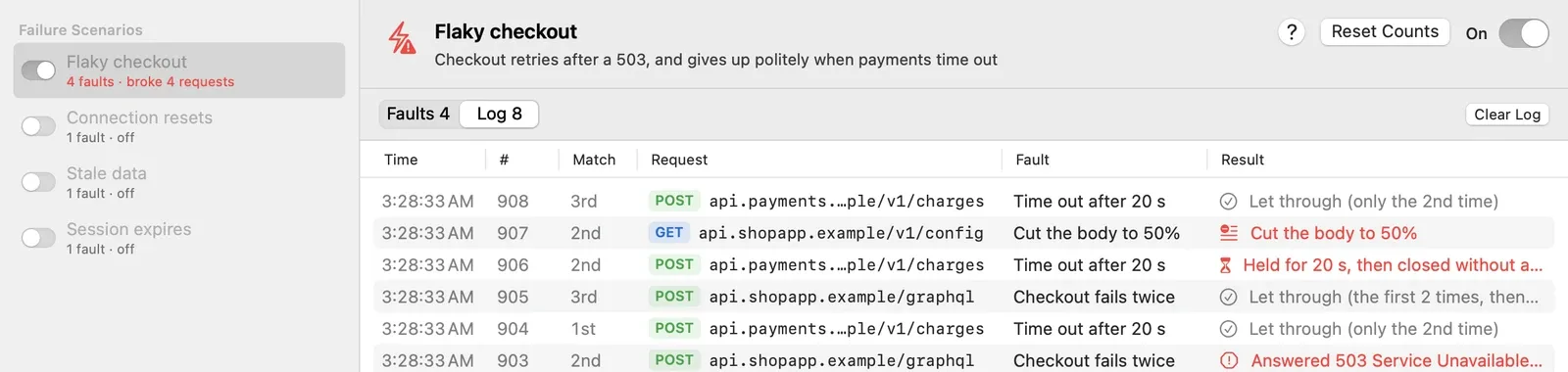
Double-click a log row to select that request in the traffic list, where broken requests carry a Failure Scenario tag. When several faults match one request, the first that fires breaks it and the others log Let through (an earlier fault applied).
Scenarios break requests until you switch them off. The N tools on button in the bottom bar shows when one is on and has a switch for each.
Run the same failures in CI
With the app running, cloakctl creates a scenario from a template, switches it on around the test run, and saves the log:
cloakctl scenarios create --template "Session expires" \
  --url 'api.example.com/v1/*' --name "Expired session" --on
npm run test:e2e
cloakctl scenarios log "Expired session" --json > scenario-log.json
cloakctl scenarios off "Expired session"
--operation CreateOrder limits a template’s faults to one GraphQL operation, and cloakctl scenarios on "Flaky checkout" switches on one you built in the window. The commands exit with 1 when the app isn’t running or the scenario doesn’t exist, so a typo fails the job instead of quietly testing the happy path. Run the off step even when tests fail (in GitHub Actions, if: always()).
Without the app, export your rules with the scenario switched on (Tools › Export Rules… includes scenarios) and wrap the test command in a headless proxy:
cloakctl run --port 9091 --ssl 'api.example.com' --tools rules.json -- npm run test:e2eLeave --fail-on-5xx and --fail-on-error off here: the failures are on purpose, and your assertions are the real check. cloakctl ships inside the app, so the job needs a macOS runner with Cloak Proxy installed (GitHub’s hosted runners don’t have it), or a Linux runner with the Linux beta, which installs cloakctl too and runs the proxy with cloak-proxy --headless. Counts and the log reset when the proxy restarts, and the log keeps the last 2,000 events.
Already using Toxiproxy?
Toxiproxy is Shopify’s framework for simulating network conditions: a TCP proxy with an HTTP API on port 8474 and clients in many languages. Its toxics include latency, bandwidth, timeout, reset_peer, slicer, limit_data, slow_close and, since version 2.13.0, packet_loss.
Cloak Proxy can serve a Toxiproxy-compatible API, so a suite that drives Toxiproxy can point at it and show every broken request in the traffic list. Switch on Toxiproxy API under the scenario list, or:
cloakctl toxiproxy on
curl -s -X POST localhost:8474/proxies -d '{"name":"api","listen":"127.0.0.1:26380","upstream":"127.0.0.1:8080"}'
curl -s -X POST localhost:8474/proxies/api/toxics -d '{"type":"latency","attributes":{"latency":1000}}'
Each proxy’s toxics become a scenario named Toxiproxy: api, with counts and a log. But the two work at different levels:
| Toxiproxy | Cloak Proxy’s Toxiproxy API | |
|---|---|---|
| Works on | Raw TCP bytes, any protocol | Whole HTTP and HTTPS requests |
| Upstreams | Anything over TCP: Postgres, Redis, queues | HTTP or HTTPS only |
stream (upstream or downstream) |
Toxic acts on one direction | Accepted and kept, but acts on the request and response as a whole |
timeout of 0 |
Holds the connection until the toxic is removed | Closes after an hour |
packet_loss |
Supported since 2.13.0 | Refused with a 400 error |
| Runs as | A standalone Go server | Part of the Mac app or the Linux beta |
Keep the real Toxiproxy for server-side tests that break a database, cache or queue, and for byte-level behavior such as slicer splitting data into small TCP chunks. Use Cloak Proxy when your tests talk HTTP and you want to see each broken request, or break one GraphQL operation or exactly the Nth request.
When to shape the whole device’s network
Cloak Proxy only affects HTTP that goes through it and that it can read. Tunnels it doesn’t decrypt and WebSocket messages run at full speed, and traffic that skips the proxy, such as HTTP/3 over QUIC, isn’t touched, unless you route that Mac app through App Capture, which also blocks its HTTP/3 so it falls back to TCP. For slowness across everything the device does, use the platform tools:
- Apple Network Link Conditioner. On development iPhones it’s under Settings › Developer, with editable profiles. Xcode’s device conditions, in the Devices window, simulate high latency, low bandwidth, packet loss and slow DNS on a connected device.
- Android emulator. Start it with
-netdelayand-netspeed, using presets such asedge,umtsorlte, or exact values. They apply to the emulator’s Ethernet and cellular networks. - Chrome DevTools. Custom network throttling profiles set download, upload and latency for web apps, plus packet loss for WebRTC traffic.
emulator @Pixel8_API_34 -netdelay umts -netspeed edgeThrottle to judge how the app feels; use a scenario to prove each error path works.
Sources
- Cloak Proxy docs: Failure scenarios, Network Conditions, Toxiproxy-compatible API, cloakctl and Headless runs and CI.
- Shopify: Toxiproxy (TCP proxy, port 8474, toxics).
- Apple: timeoutIntervalForRequest, the archived On-Demand Resources testing guide (Network Link Conditioner) and WWDC19: Debugging in Xcode 11 (device conditions).
- Android: Start the emulator from the command line. Chrome: DevTools throttling settings.
Checked on 20 October 2026.
FAQ
Do failure scenarios affect every app on my Mac?
Only requests that match a fault's URL pattern, method and conditions, and only while its scenario is on. To limit a fault to your own app, type its name in the Only these apps field under the URL pattern, for example MyApp.
Can I break HTTPS requests?
Yes, once Cloak Proxy decrypts the host with SSL Proxying, so it can read the URL and body that a fault matches on. HTTPS it passes through as an encrypted tunnel isn't matched by URL.
Will my existing Toxiproxy tests work against Cloak Proxy?
If they break HTTP or HTTPS services, mostly yes: switch on the Toxiproxy-compatible API and point the client at 127.0.0.1:8474. Tests that break databases or other TCP protocols, or rely on packet_loss or per-direction toxics, need the real Toxiproxy.
Does this replace Network Link Conditioner?
No. Network Link Conditioner and the Android emulator's network options slow the whole device, including traffic that never goes through a proxy. Failure scenarios break specific HTTP requests on a schedule. Use both: one for slowness, the other for error handling.