How to · Cloak Proxy
See what Claude Code sends to the API.
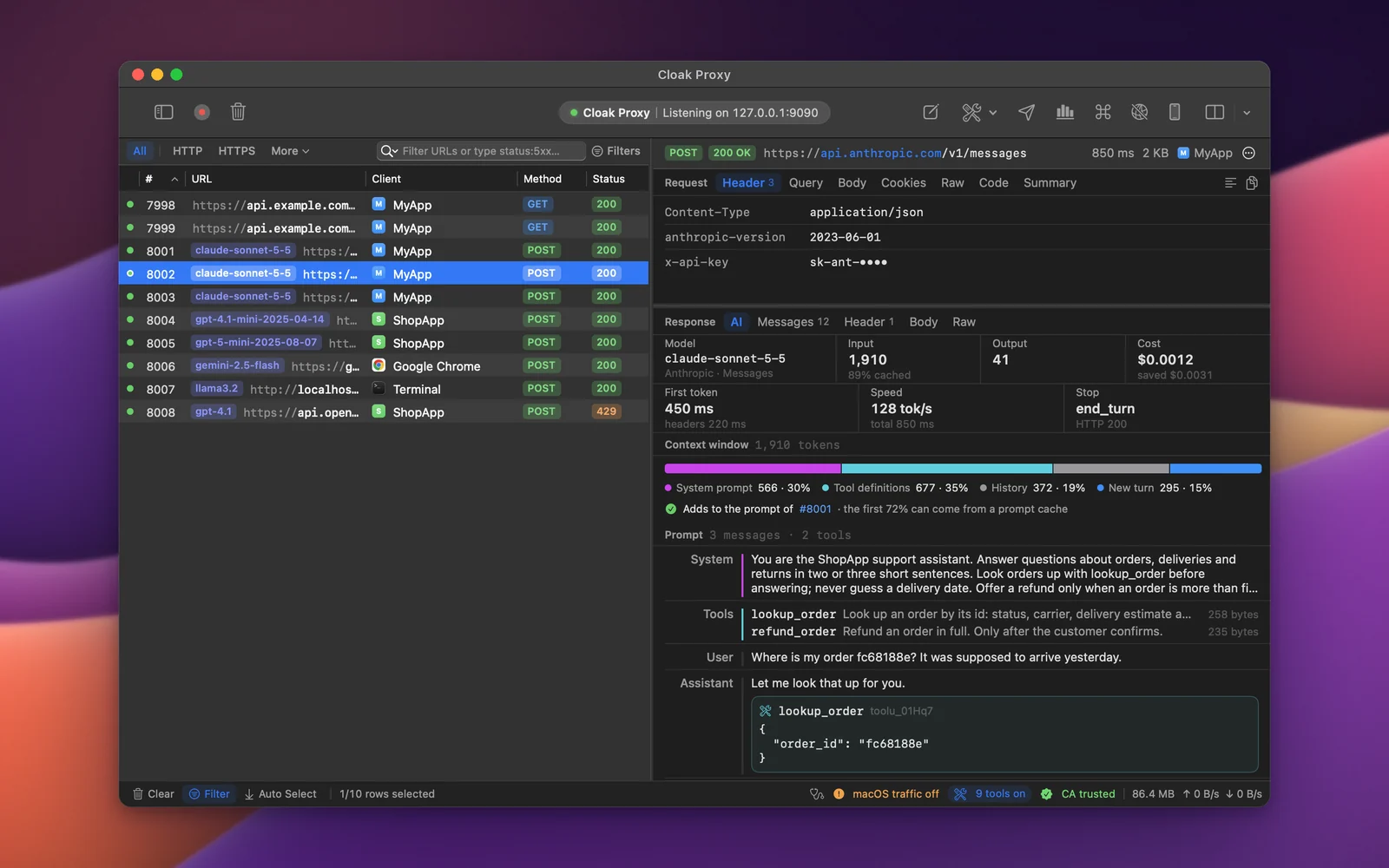
Claude Code is a command-line tool that reads the standard proxy and certificate environment variables. Start it from a Terminal window Cloak Proxy configured, decrypt api.anthropic.com, and the LLM Inspector shows every model call: the prompt, tools, tokens, cost, time to first token and how much came from the prompt cache.
Step by step.
Install Cloak Proxy and trust its certificate
Download Cloak Proxy (free, no account) and open it. In the orange banner, click Install & Trust… and confirm with your Mac password. The certificate is made on your Mac and is unique to your install.
Decrypt the model API
Add
api.anthropic.comin Cloak Proxy › Settings… › SSL Proxying (for OpenAI,api.openai.com).Open a configured Terminal
Click Devices in the toolbar, choose Terminal and click Open Terminal. Programs started in that window send their traffic through Cloak Proxy and trust its certificate; your other windows aren't affected.
Or, in a shell you already have open eval "$(cloakctl env)"Run Claude Code in that window
Use it as usual. Each model call appears in the traffic list as it streams, with an indigo badge naming the model.
Open the AI tab
Click AI in the filter bar to show only model calls, and select one. The AI tab shows the model, input and output tokens, the share read from the prompt cache, the cost, time to first token, where the context window went, and each tool call with its result.
Every option, screenshot and error message is in the docs:LLM Inspector, Terminal and runtimes, Debug with Claude.
FAQ
If something doesn't show up.
Something else? Email hello@subcloak.com or book a call.
Which APIs does it read?
OpenAI Chat Completions and compatible servers, OpenAI Responses, Anthropic Messages, Google Gemini and Ollama, streamed or not.
A tool that ignores HTTPS_PROXY
Many Go and Rust binaries skip the proxy variables. App Capture sends a Mac app's traffic through Cloak Proxy whatever it reads.
Where do my prompts go?
Nowhere: captured traffic stays on your Mac. The calls include your API key in a header, so take care when you export or share a session.
Try it on your own traffic.
Free for life, macOS 14 Sonoma or later, Apple silicon or Intel; Linux in beta. No account, no sign-up.